4 Online Passport Photo Maker Options: Comparing Verification and Print Methods
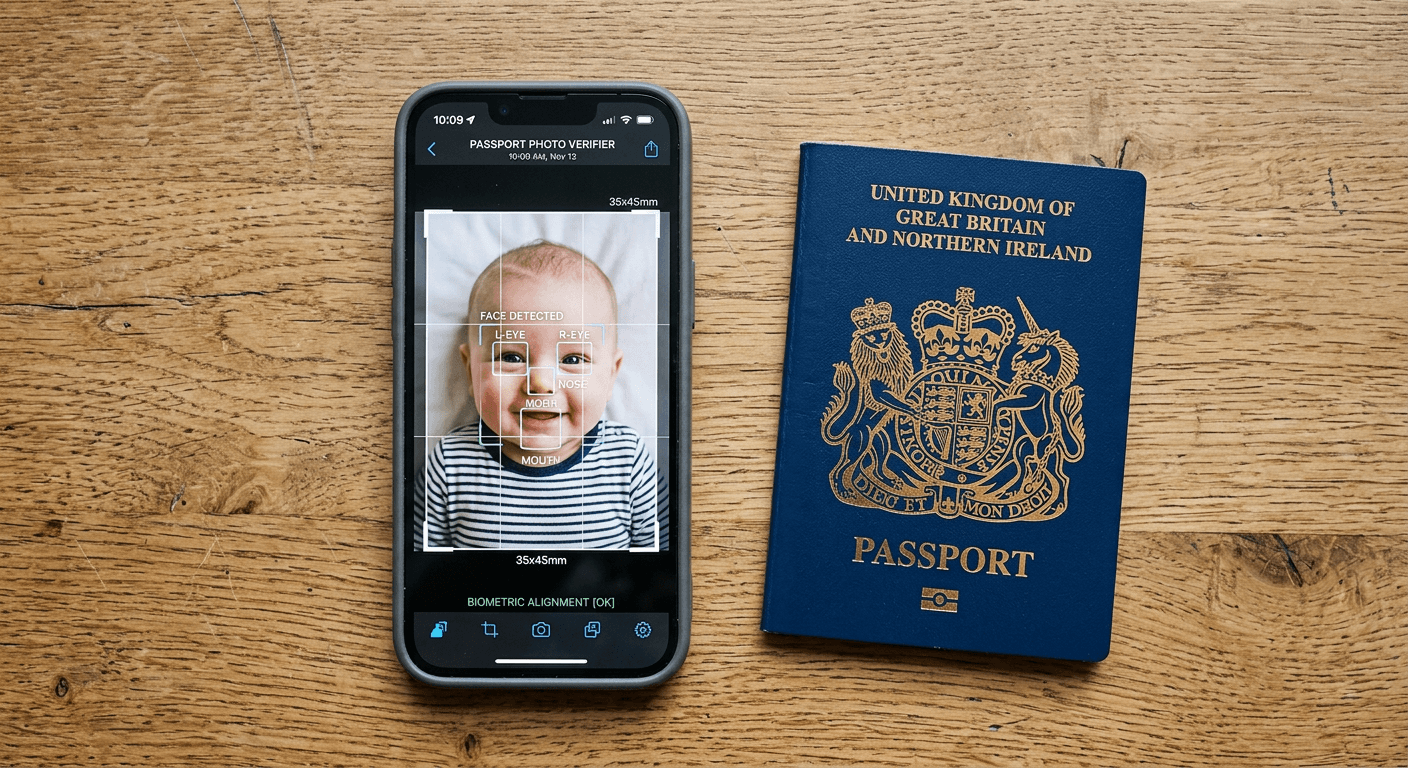
Positioning a newborn on a white sheet, trying to keep their chin up while avoiding overhead lighting shadows, is the moment most parents realise why professional studios charge a premium. When an application deadline looms, testing the threshold of HM Passport Office's biometric scanners with a mobile phone camera becomes a high-stakes gamble. The physical dimensions, background consistency, and facial exposure rules leave very little margin for error, and a single shadow cast across the cheek can reset a week-long processing queue.
Quick Summary
An online passport photo maker validates smartphone images against official biometric standards, stripping out non-compliant backgrounds and correcting head-to-chin ratios before printing. Choosing the right tool depends on whether you need human expert review or rely entirely on automated artificial intelligence to guarantee acceptance.
- Artificial intelligence tools remove shadows and scale proportions without software installation.
- Human-assisted platforms reduce the rejection risk for difficult infant photography.
- Manual cropping utilities require the user to understand specific dimensional criteria.
- Digital file delivery is standard, though several platforms offer physical print shipping.
Table of Contents
- Where biometric software fails
- 1. PhotoGov
- 2. Passport Photo Online
- 3. PhotoAiD
- 4. IDPhoto4You
- Which verification model matches your application
- Recommended Reads
| Product | Verification Model | Features | Pros | Cons | Target Audience |
|---|---|---|---|---|---|
| PhotoGov | AI-Only Verification | Browser-based, automatic cropping | Digital & print options, No installation, Background adjustment | Capacity limits on free tier, Paid prints cost £7.30, Requires good source lighting | Adults capturing straightforward portraits |
| Passport Photo Online | Human-Assisted Verification | AI + human expert review, iOS/Android apps | Double refund guarantee, Expert validation, App convenience | 2-3 day print delivery, Higher digital cost, Human review adds friction | Parents submitting infant applications |
| PhotoAiD | AI-Only Verification | 150+ document profiles, Digital verification | 100% compliance guarantee, Free print delivery, Global document support | Premium pricing for automated tool, No human oversight, Requires sharp initial capture | Frequent international travellers |
| IDPhoto4You | Manual Cropping Utility | Web-based interface, Dimensional guidelines | Completely free, Instant processing, Browser accessible | Total user responsibility, No compliance guarantee, Difficult for infant photos | Budget-conscious users familiar with specs |
Where biometric software fails
When a government portal rejects an upload, it rarely explains exactly which pixel failed the compliance check. Finding a reliable online passport photo maker requires understanding what these platforms actually do to your image. The legal standard demands that the subject's head occupies exactly 29 to 34 millimetres of the frame vertically. There can be no red-eye, no glare on spectacles, and absolutely no background clutter. These rigid UK and international baby passport photo requirements create a significant bottleneck for home users who lack a dedicated studio lighting setup.
To bypass these technical hurdles, the digital processing market operates on a specific classification axis based on the Verification Model applied to the image data. Every system falls into one of three distinct categories. The first is AI-Only Verification, where algorithms map the eyes, nose, and chin, calculate the required space, and aggressively replace background pixels without any human intervention. The second is Human-Assisted Verification, which combines initial machine learning extraction with a final visual inspection by a trained operator before releasing the file. The final category is the Manual Cropping Utility, which provides a blank canvas and a calibrated overlay, leaving the user to drag a bounding box and hope their alignment meets the legal criteria.
Choosing a UK baby passport photo maker that understands these dimensions natively prevents costly administrative delays. Relying purely on algorithms works brilliantly for an adult standing perfectly straight against a plain wall. It struggles severely when attempting to extract an infant's wispy hairline from a textured blanket. If the subject cannot sit unassisted, the verification model you select dictates whether you are offloading the compliance risk or merely changing the editing interface.
Practical rule: Do not apply digital compression to an image before uploading it; biometric systems measure pixel density as well as facial geometry, and WhatsApp or email compression will cause immediate rejection.
1. PhotoGov
When an image enters PhotoGov, the system maps facial landmarks, recalculates the head-to-chin proportion, and replaces the existing background pixels with a uniform layer. Operating as an AI-Only Verification system, it completely removes the need to manually erase shadows or isolate the subject's outline using standard editing software.
By running its models in the cloud rather than locally, the platform analyses the upload against biometric requirements instantly. The tool operates inside a mobile browser on any device. It requires no account registration or software installation. This makes it highly accessible for applicants who only need to format a single document and do not want to sacrifice storage space for a single-use application. According to its published pricing, generating a digital photo file costs £4.40 for buyers in the United Kingdom. A printable file costs £7.30.
I would hold off on this if the source photograph suffers from severe motion blur, as automated mapping requires crisp edge contrast to identify where the cheek ends and the background begins. Interestingly, the platform permits each user to generate one free ID photo per day, which is automatically sized and cropped to a selected document type.
Daily limits enforce capacity constraints
The honest limitation here revolves around that free tier. Because the one complimentary generation per day depends entirely on available server capacity, users facing a hard application deadline might find themselves locked out of the free route precisely when they need to export their file, forcing a paid upgrade at the last minute.
Adults who have captured a well-lit, sharply focused portrait should use this to bypass manual formatting without downloading heavy mobile applications.
Pros
- Operates entirely within a standard mobile browser
- Replaces uneven background textures automatically
- Does not require mandatory account registration
Cons
- Free access is strictly conditional on server load
- Physical print pricing sits at £7.30 for UK buyers
- Struggles with poorly lit source photographs
2. Passport Photo Online
A rejected application letter often arrives with a warning. Another failed image will reset the entire processing timeline. This sends many parents looking for a safety net. Passport Photo Online answers this by operating as a Human-Assisted Verification platform. It combines automated AI extraction with a final review by human experts to format and verify ID photos before they are dispatched to the applicant.
The tool is available as a native mobile application on both iOS and Android platforms. Users gain direct access to their device's camera roll. This avoids navigating browser upload limits. This hybrid approach significantly reduces the risk of rejection. This is critical for complex infant photography where standard algorithms often misinterpret closed eyes or open mouths. Its UK pricing is £9.95 for a digital image sent directly to an inbox, or £12.95 to include four physical prints. To back up its verification, it offers a double-your-purchase-cost refund if government authorities reject the prepared photo.
I would hesitate to rely on this if I only needed a low-stakes profile picture, as the presence of human experts inevitably adds overhead to the cost. Incorporating a professional photo editor into the workflow ensures that subtle issues, such as a slight head tilt or a hidden shadow behind the ear, are flagged before the file is finalised.
Expert review dictates turnaround timelines
The primary constraint lies in the physical delivery schedule. The physical print delivery timeline of two to three business days makes this unworkable for urgent same-day or next-day passport renewals, forcing applicants to rely solely on the digital file and find a local retail kiosk for immediate printing.
Parents dealing with wriggling infants who want the reassurance of a human checking the file before submission should make this their primary choice.
Pros
- Combines algorithmic cropping with human oversight
- Provides native applications for iOS and Android
- Offers a double refund if the image is rejected
Cons
- Physical prints require two to three days for delivery
- Digital pricing is £9.95, reflecting the human review cost
- Slower processing time than purely automated platforms
3. PhotoAiD
"Does this system know the specific background colour required for a Schengen visa versus an Australian passport?" As an AI-Only Verification system, PhotoAiD is a digital photo creator and verification tool that edits and prepares biometric identification images for passports, visas, and driving licences.
It maintains a database of specific dimensional ratios, background hues, and resolution rules for multiple document types. The software aggressively crops and centres the subject to meet these strict international criteria, replacing non-compliant backgrounds with the exact shade of grey or white demanded by the target jurisdiction. Pricing in the UK is £9.95 for a digital photo or £12.95 for physical prints, backed by a 100% compliance guarantee. It provides a double money-back refund if HM Passport Office rejects the photo, placing immense confidence in its automated algorithms. Look for providers offering a strict refund policy when dealing with highly sensitive international visa applications.
I would skip this option if the applicant is highly sensitive to price and only requires a standard, well-documented format, because the software charges a premium for its automated verification. Using an online photo creator for complex cross-border applications saves hours of manual research, but the applicant must still ensure the raw capture is sharply focused and evenly lit.
Practical rule: Always capture the original image against the clearest background available, even when using software designed to replace it, as high-contrast edges prevent the system from accidentally cropping out fine hair.
Broad document support comes at a premium
Cost represents a significant barrier when weighed against the complete lack of human intervention. Charging a premium for a digital file generated purely by software without an expert's secondary check means the pricing sits at the absolute upper ceiling of what an automated extraction utility can reasonably command in a competitive market.
Frequent international travellers managing multiple distinct visa requirements should use this to centralise their document preparation and avoid researching individual country rules.
Pros
- Supports compliance checks for over 150 distinct documents
- Includes free delivery on the £12.95 physical print package
- Backs its software with a double money-back guarantee
Cons
- Charges a premium price for purely automated extraction
- Lacks the safety net of human expert verification
- Relies entirely on the quality of the user's initial photograph
4. IDPhoto4You
Unlike automated platforms that attempt to detect facial features and apply government standards independently, this tool hands total control back to the user. Operating strictly as a Manual Cropping Utility, IDPhoto4You is a free, web-based photo cropping utility that helps users adjust and crop their digital photos into passport and ID card dimensions.
The platform does not deploy machine learning models to detect eyes or measure chin-to-crown distances. Instead, it provides a calibrated overlay where the user must manually zoom, rotate, and align their uploaded image against a set of fixed guide marks. Because it demands active participation, it acts more like a traditional id photo maker than an intelligent verification system. This approach removes any processing delays and avoids subscription fees or digital download charges entirely. Finding a free passport photo maker that does not watermark the final output is rare, which makes this highly valuable for those who understand exactly what their specific government authority demands.
If I were processing a newborn's application, I would not choose this route, simply because infants rarely look straight at the camera and determining the precise centre line manually is incredibly difficult.
Total control transfers the rejection risk
Because the utility relies entirely on the user's judgement to align the eyes and chin correctly within the digital frame, the risk of formal rejection falls squarely on the applicant's shoulders, with no safety net, compliance guarantee, or refund policy available if HM Passport Office deems the manual measurements inaccurate.
Budget-conscious applicants who possess a flawless, evenly lit original photograph and already know their exact document specifications should rely on this utility to avoid unnecessary formatting fees.
Pros
- Operates entirely free of charge without watermarks
- Requires no software downloads or account creation
- Processes images instantly through a web browser
Cons
- Leaves the entire compliance risk with the applicant
- Lacks automated background removal or shadow correction
- Proves highly difficult to use accurately for infant photos
Which verification model matches your application
Selecting the correct software requires matching the complexity of the subject to the capability of the platform. An AI-Only Verification tool is designed for well-lit adult portraits where the software can easily distinguish the subject from the background. This approach strips away manual editing time and delivers an instantly usable file, provided the initial capture is sharp. Consulting a dedicated help center can clarify specific visa dimensions if the automated system flags an error during the initial upload.
When photographing babies or toddlers, a Human-Assisted Verification platform is usually necessary. The unpredictable angles, slight head tilts, and inevitable shadows cast by parents supporting the infant often confuse purely automated systems. Having a human operator review the final crop prevents the application from entering a rejection loop at the passport office.
A Manual Cropping Utility should only be deployed by users who possess a firm grasp of biometric regulations. It offers the distinct advantage of being completely free, but it offers zero diagnostic feedback. If the user misjudges the chin-to-crown ratio by three millimetres, the software will not intervene, and the passport authority will reject the file outright.