Comparing the best tools for a canadian passport photo in 2026
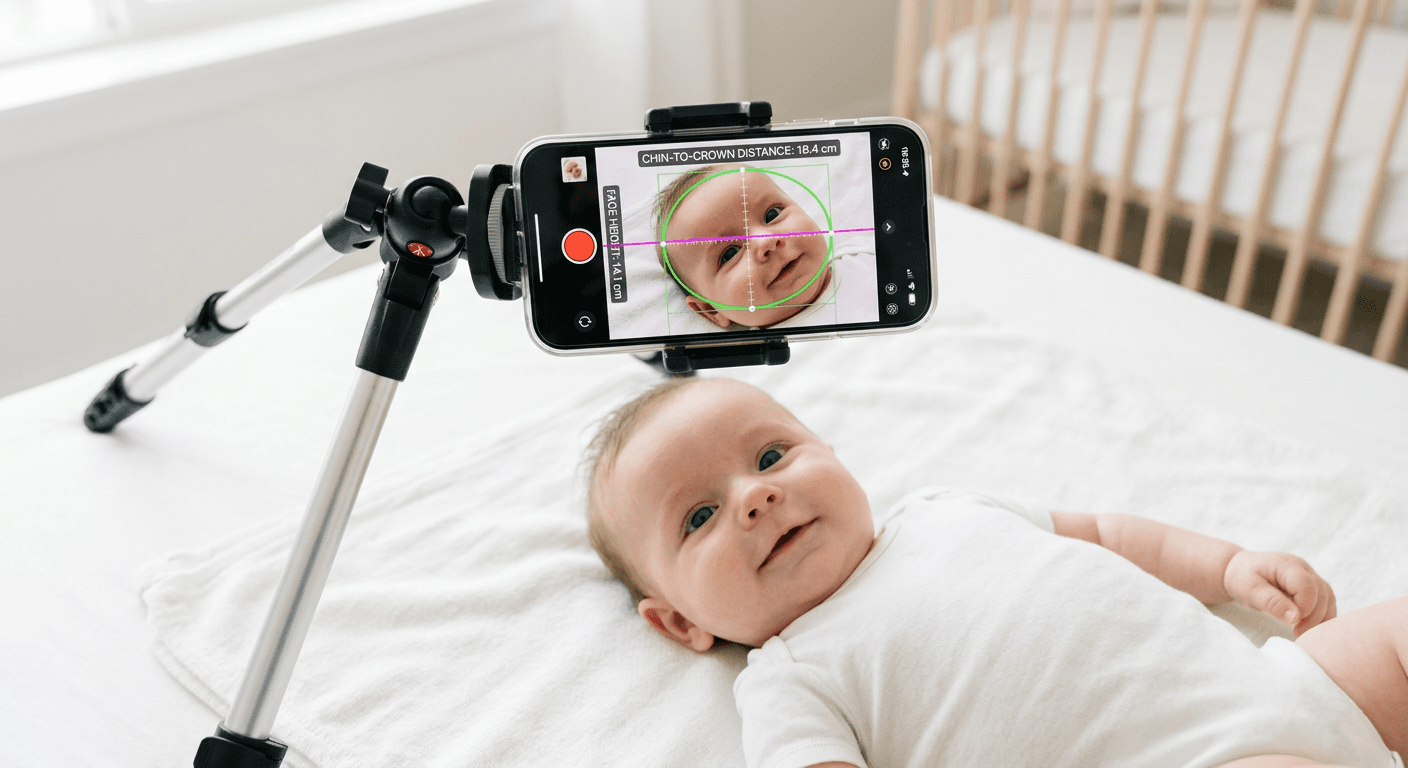
You have finally managed to keep an infant looking directly at a smartphone lens for a fraction of a second, only to realise the background lighting throws a sharp shadow across one ear. For expatriate families submitting dual applications, capturing a compliant canadian passport photo at home means navigating two entirely different sets of biometric requirements simultaneously. A digital file that perfectly matches European standards will be instantly rejected by North American authorities. Understanding how biometric algorithms process these images prevents weeks of administrative delays, especially when dealing with uncooperative subjects.
Quick Summary
Generating compliant document images requires tools that map facial geometry to specific governmental constraints. A valid canada passport photo relies on exact millimetre measurements for face height, while an irish passport photo demands specific digital pixel dimensions for online submission. Choosing the right tool depends entirely on whether you need instant digital files or physical prints.
- Canadian rules enforce a 50x70mm dimension with a 31-36mm face height.
- Irish digital renewals require exact 715x951 pixel constraints.
- Service choices split between automated AI processing and human-verified print preparation.
- File size limits and allowed formats dictate which smartphone captures you can actually use.
Table of Contents
- Why biometric sizing fails at the algorithm level
- Buying Guide / How to Choose
- 1. PassportSnap
- 2. PhotoAiD
- 3. Foxly Passport Photo
- 4. PhotoGov
- Matching your deadline to the service model
- Recommended Reads
Why biometric sizing fails at the algorithm level
Government portals do not look at photographs; they read data arrays. When you upload a passport size photo canada requires, the portal's intake software immediately scans for eye level coordinates, head tilt angles, and background pixel uniformity. If the distance from the chin to the crown of the head falls outside the 31mm to 36mm tolerance, the submission drops into a rejection queue. This mathematical scrutiny means a visually perfect picture fails if the software compiling the file did not lock the geometry to the destination country's exact template.
Buying Guide / How to Choose
Selecting a formatting tool comes down to understanding how the software handles your biometric data and how it delivers the final product. Every valid platform strips the background and scales the face, but they diverge sharply on how much human oversight they allow and whether they output data or paper. For families navigating multiple jurisdictions, checking comprehensive UK & International Baby Passport Photo Requirements & Guides prevents dual rejections.
We separate these tools along a specific Service Format axis into three distinct categories:
- Instant Digital Processing: Software that strictly edits and scales uploaded files through automated scripts, outputting a downloadable image within seconds. These platforms never use human reviewers.
- App-Based Verification: Applications that guide the physical capture process while running an automated global compliance check against a database of document rules. They act as a real-time digital booth.
- Manual Preparation & Print: Services where human operators intercept the file, manually adjust the crop and background to meet regulations, and physically mail the final prints.
Practical rule: Never evaluate a digital formatting tool by its interface; judge it by the biometric parameters it explicitly guarantees to measure and correct.
| Product | Service Format | Features | Pros | Cons | Target Audience |
|---|---|---|---|---|---|
| PassportSnap | Instant Digital Processing | 99p instant download, 20MB file limit, local formatting | Immediate delivery, highly private, low cost | No human oversight, file size capped, assumes good source lighting | Privacy-conscious users needing fast digital layouts |
| PhotoAiD | App-Based Verification | Formats for multiple countries, compliance checking | Vast global database, strong reviews, real-time feedback | Overly strict rejection logic, no manual crop adjustments, frustrating for infants | Users wanting algorithmic reassurance before high-stakes submissions |
| Foxly Passport Photo | Manual Preparation & Print | Human review, physical prints, digital codes | Professional oversight, tangible copies, catches subtle errors | Slow turnaround, UK and Ireland delivery only, higher cost | Local applicants preferring postal delivery over digital editing |
| PhotoGov | Instant Digital Processing | AI cropping, exact pixel sizing, multiple file formats | Precise digital dimensions, fast output, accepts HEIC formats | 10MB file limit, compresses high-res raw images, algorithmic guesses | Applicants needing exact pixel formats for online portals |
1. PassportSnap
Getting a compliant image usually requires uploading sensitive biometric data to unknown servers, a bottleneck that makes many applicants uncomfortable. PassportSnap is a privacy-focused, browser-based generator that formats files locally without storing them indefinitely. Reviewing a platform's Privacy Policy reveals how long your biometric data remains on external servers, but this tool bypasses the issue entirely by processing the image on your own machine. It is built for applicants who need immediate files for North American documents without compromising data security.
The tool operates strictly within the Instant Digital Processing category. It requires no account. When you upload a JPG or PNG file (up to a maximum size limit of 20MB), the system uses an AI script to detect the head position and background. For Canadian requirements, it specifically maps the face to ensure it falls within the required proportions and outputs the final file to the strict 50x70mm specification. According to its published pricing, it then provides the compliant photo and a print-ready 6x4 inch layout sheet as an instant download for 99p. The background is stripped and replaced with a uniform colour, while the facial geometry is locked to the exact coordinates demanded by the destination country.
Privacy-first processing limits manual intervention
Browser-based AI tools operate entirely without human oversight. Suppose the original photograph features uneven lighting or a complex background. The script might misinterpret these details. If it does, the output simply locks the error into the correct dimensions. It never alerts you to subtle shadowing or posture issues. A human reviewer would flag those problems immediately. I would hold off on using this if the source image was taken in challenging lighting conditions where the contrast between the subject and the wall is low.
Choose this tool when you have a well-lit, clear source photo and require an immediate, strictly formatted digital file without paying a premium.
Pros
- Ensures biometric data remains off external servers
- Generates print-ready layout sheets instantly
- Costs significantly less than traditional booth formats
Cons
- Fails to identify soft lighting or posture errors
- Restricts image uploads to a 20MB maximum limit
- Relies entirely on the user supplying a flawless source image
2. PhotoAiD
On Trustpilot, reviewers rate this platform heavily, maintaining an average TrustScore of 4.5 out of 5 based on over 13,000 reviews. PhotoAiD functions as an AI-driven online passport photo booth and compliance checker designed to verify biometric photos for a vast array of global travel documents. It serves applicants who want automated reassurance that their smartphone captures meet exact international criteria before submission.
Operating within the App-Based Verification category, the software scans the uploaded image against a database of global document parameters. For North American documents, it formats the image to the mandatory 50x70 mm size while mathematically isolating the subject to ensure a 31mm to 36mm face height from chin to crown. Simultaneously, if an applicant selects European parameters, it formats the file to the required 35 x 45 mm size for Irish applications. The system evaluates the capture for common failure points such as head tilt, eye visibility, and background uniformity, actively cropping the raw file to strip out non-compliant backgrounds and replacing them with the designated flat tone. Manual overrides are impossible.
Global compliance checks come with automated rigidity
The rigidity of the verification engine means it rejects perfectly usable photos if they fall marginally outside its programmed tolerance for lighting variance. Applicants struggling with lighting can consult a Help Center to understand why shadows trigger automated failures. It forces users to retake images repeatedly if the smartphone sensor introduces minor grain or if the ambient light creates a soft gradient on the cheek, even when official guidelines might permit it. The system lacks the flexibility to manually adjust the crop if the AI misidentifies the top of the head due to voluminous hair. I would hesitate to rely on this if photographing an infant who cannot hold a rigid, perfectly neutral expression, as the continuous automated rejections become incredibly frustrating.
This software fits users who want strict algorithmic validation of their framing and dimensions prior to initiating a high-stakes visa or passport application.
Pros
- Verifies against a massive database of global document rules
- Isolates the exact face height measurements required by authorities
- Identifies specific failure points before official submission
Cons
- Rejects photos for minor variations that humans would pass
- Prevents manual adjustment of the automated crop
- Frustrates users trying to capture moving infants
3. Foxly Passport Photo
Unlike automated systems that generate a digital file in seconds based entirely on algorithmic guesses, this service inserts a human into the production loop. Foxly Passport Photo provides manually prepared digital codes and printed biometric photos via its online service and mobile app. It targets applicants who prefer the reassurance of human review and require physical copies shipped directly to their door.
As a textbook example of the Manual Preparation & Print category, the workflow begins when a user uploads their capture to the platform. Instead of an immediate algorithmic crop, human operators manually review the file, adjust the background, and align the facial features to meet the destination's criteria. According to its published pricing, the platform offers a digital photo or code delivered by email for £5, printed copies for £5 plus delivery, and a combined digital and printed bundle for £10 plus delivery. For standard European submissions, the printed package includes either 6 standard printed copies sized 35 x 45 mm or 4 custom size printed photos, depending on what the specific national authority demands. Immediacy is completely lost.
Human preparation restricts delivery speed and geography
Inserting a manual review process inherently destroys the speed of the transaction. You cannot upload a photo and download a compliant file two minutes later, making it useless for applications that are due the same afternoon. Furthermore, the physical logistics heavily constrain its reach; the company officially restricts delivery of printed photos to the United Kingdom and Ireland only. This geographic limitation entirely excludes expatriates living in North America or mainland Europe who need compliant physical prints delivered to their current residence. What would make me hesitate is the reliance on postal services, which introduces tracking uncertainties into an already stressful administrative process.
Opt for this service if you live in the designated delivery zones and prioritise human review over immediate digital turnaround.
Pros
- Replaces algorithmic guessing with manual professional adjustments
- Delivers physical copies directly without requiring a retail kiosk visit
- Supplies specific bundle configurations for different national sizes
Cons
- Mandates a longer wait time due to human processing
- Restricts printed postal delivery to the UK and Ireland
- Introduces postal tracking risks to sensitive application timelines
4. PhotoGov
When a file enters this platform, the software immediately strips the background pixels, maps the facial landmarks, and applies an automated crop based on the selected country's parameters. PhotoGov acts as an independent, AI-powered online photo tool that edits and adjusts backgrounds for official ID documents. It is aimed at users who need highly specific digital dimensions for online portals and paper applications alike.
The system acts as a pure Instant Digital Processing engine. For users navigating the exact ireland passport photo requirements, it formats online submissions to the precise size of 715 x 951 pixels in JPEG format. For North American documents, it formats images to 50 x 70 mm for paper applications, and scales between 1,200 x 1,800 to 3,000 x 4,500 pixels for digital renewals. The software accepts .jpg, .png, .heic, and .gif formats, ensuring compatibility with modern smartphone camera outputs. On Google reviews, it holds a rating of 4.7 out of 5 stars based on more than 2,500 ratings, reflecting its processing efficiency. Processing speed remains high.
Algorithmic cropping struggles with heavy raw files
The processing engine enforces a hard maximum file size limit of 10 MB for all uploads. Modern smartphone cameras, particularly those shooting in high-efficiency formats or raw modes, frequently produce files that exceed this ceiling. This forces the user to manually compress their photograph before they can even feed it into the tool, introducing compression artifacts that could degrade the biometric clarity of the subject's face. If an algorithm rejects a file, understanding a platform's 100% Refund Policy dictates whether you lose money on a faulty crop, but pre-compressing files makes rejections more likely. I would bypass this platform if dealing with heavy, uncompressed image files straight from a dedicated digital camera.
Select this web tool when you are uploading standard smartphone images and need exact pixel dimensions tailored for specific government online portals.
Pros
- Outputs exact digital pixel dimensions for strict portal renewals
- Processes a wide variety of standard smartphone image extensions
- Scales seamlessly between paper print dimensions and digital formats
Cons
- Blocks uploads entirely if the source file exceeds 10 MB
- Forces users to understand how to compress their own raw files
- Relies completely on AI background stripping without human review
Matching your deadline to the service model
Choosing a platform depends entirely on how quickly you need the file and what format the destination portal accepts.
Instant Digital Processing suits applicants who face an immediate deadline and possess a well-lit, clearly framed source photo. It removes the friction of account creation and manual review, returning a strictly formatted file that you can either upload instantly or print at a local kiosk.
App-Based Verification provides a necessary safety net for users submitting high-stakes visas who cannot afford a rejection. By running the capture against a global database in real-time, it trades flexibility for absolute algorithmic certainty, making it ideal for standard adult applications but challenging for wrangling infants.
Manual Preparation & Print is necessary for applicants who prefer to offload the entire formatting burden to a professional. If you have the lead time to wait for postal delivery and reside within the supported geographic footprint, having a human operator align the facial geometry removes the stress of relying on automated scripts.