A Complete Guide to India Passport Photo Dimensions in 2026
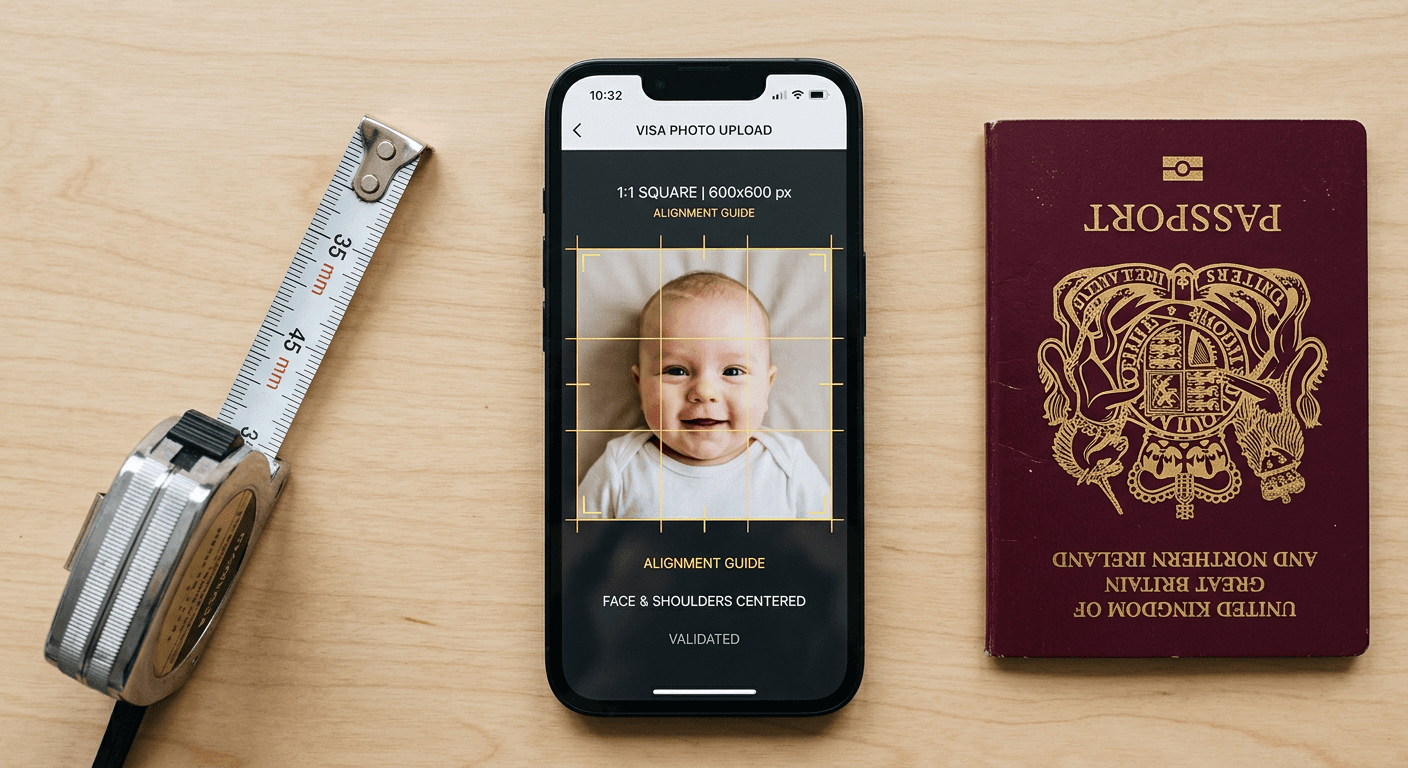
Most applicants assume the photograph they used for their local driving licence or national identification will simply carry over to an international visa application. This is the exact assumption that causes the VFS Global processing centres and the Indian e-Visa portal to automatically reject thousands of applications every week. The digital infrastructure does not accept a standard rectangular portrait; it requires a strict 1:1 square. Getting the india passport photo dimensions correct involves much more than resizing a JPEG. You must align the precise chin-to-crown ratio, achieve the flat illumination that satisfies automated biometric edge-detection algorithms, and navigate a narrow bracket of digital file weights without triggering compression artifacts.
Quick Summary
The Indian visa and Overseas Citizen of India (OCI) portals require a distinct 1:1 square photograph rather than the standard rectangular format. Submitting a compliant file requires strict adherence to physical proportions, digital compression limits, and biometric visibility.
- Physical framing: The standard mandates a 51 mm x 51 mm (2x2 inches) format.
- Digital limits: Uploads must measure between 350x350 and 1000x1000 pixels.
- File weight: The JPEG must remain strictly between 10 KB and 300 KB.
- Biometrics: The subject's head must dominate the vertical frame, leaving clear margins above the crown and below the chin.
Table of Contents
- Understanding India Passport Photo Dimensions Requires a Square Approach
- 1. Frame the Subject for the Mandatory Aspect Ratio
- 2. Match the Strict Government Background Standards
- 3. Light the Subject to Eliminate Biometric Rejections
- 4. Format the Digital File for the e-Visa Portal
- 5. Account for Infant-Specific Posture Limits
- Common Pitfalls & Troubleshooting
- FAQ
- Recommended Reads
Understanding India Passport Photo Dimensions Requires a Square Approach
The primary barrier for international applicants is the fundamental shape of the required image. While the UK and much of Europe standardise around a 45 mm x 35 mm rectangle, the india passport photo dimensions demand a strict 51 mm x 51 mm square. This 1:1 aspect ratio changes how a subject must be framed relative to the camera lens. Attempting to force a European-style portrait into an Indian visa application forces a crop that inevitably cuts into the subject's shoulders or minimises the head size, triggering an immediate rejection from the biometric verification software.
1. Frame the Subject for the Mandatory Aspect Ratio
The Rectangular Crop Fails the Automated Scanner
Indian travel documents impose physical requirements based on precise vertical measurements. Within the 51 mm square frame, the distance from the bottom of the chin to the top of the head (the crown) must measure exactly between 25 mm and 35 mm. Furthermore, the subject's eye level must sit precisely between 28 mm and 35 mm from the bottom edge of the photograph. When applicants attempt to upload a standard rectangular photo to the portal, the system's automated cropping tool activates. A rectangle lacks the required horizontal width. It cannot match the vertical height. The crop tool zooms in aggressively. This causes the chin-to-crown ratio to exceed the maximum 35 mm limit.
This specific framing error prevents the software from verifying the required distance between the pupils. The mechanics of the scan rely on finding the outer edges of the face and mapping them against the centreline of the nose. If the image is cropped too tightly, the jawline and the tops of the ears are pushed outside the measurable zone.
Practical rule: When capturing the image on a smartphone, leave at least 30% more negative space around the head and shoulders than you think is necessary, providing ample room to extract a perfect square later.
The mistake most people make is holding the camera too close to the subject's face, treating the photograph like a modern digital selfie rather than an architectural capture of facial geography. Relying on a dedicated baby passport photo maker helps resolve this by mapping the chin and crown directly onto a digital grid before generating the final 1:1 file.
2. Match the Strict Government Background Standards
Texture and Shadows Create False Positives in Edge Detection
The Indian authorities strictly mandate a plain white or off-white background. The mechanism behind this rule is the contrast required by edge-detection algorithms. The biometric software separates the subject's head from the background by looking for a sharp difference in pixel values. If the background carries texture, patterns, or gradients, the software struggles to find the true outline of the hair and jawline, interpreting the background noise as an extension of the subject.
Understanding india passport photo requirements means recognising how a camera lens captures a standard domestic wall. A white wall lit by a standard ceiling bulb does not appear white to a digital sensor; it registers as a muddy grey gradient. The mistake applicants repeatedly make is hanging a white bedsheet behind the subject. A draped sheet inevitably contains creases and folds. The directional light in the room casts micro-shadows along these folds, creating a heavily textured background that the visa portal will immediately flag as non-compliant.
The fix involves finding a solid, flat surface - such as a matte-painted door - and ensuring the subject stands at least half a metre away from it. This separation distance throws the background slightly out of focus and prevents the subject's own body from casting a hard shadow onto the surface behind them. Reviewing international baby passport photo guidelines will demonstrate exactly how this background separation ensures the outline of the head remains distinct.
3. Light the Subject to Eliminate Biometric Rejections
Directional Lighting Distorts Facial Proportions
The fundamental goal of an identification photograph is to capture flat, even illumination across the facial geography. Biometric scanners read the shadows under the nose, eyes, and chin to calculate the three-dimensional depth of the face. If the lighting is uneven, the resulting shadows artificially alter the perceived shape of the cheekbones and jaw.
The most frequent mistake is relying on side-lighting from a nearby window. If a subject stands next to a window, one half of their face is brightly illuminated while the nose casts a deep shadow over the opposite cheek. The scanning software interprets this heavy shadow as asymmetrical facial structure, leading to an immediate rejection. Conversely, using a direct smartphone flash creates specular highlights - blown-out white spots on the forehead and the tip of the nose - which destroy the pixel data the scanner requires to read skin tone and texture.
To capture compliant lighting, the subject must face the primary light source directly. A large window provides excellent diffuse light, provided the subject looks straight towards it rather than standing beside it. The light should strike both sides of the face simultaneously, eliminating shadows under the eyes and ensuring the natural skin tone is captured accurately.
4. Format the Digital File for the e-Visa Portal
Native Smartphone Compression Breaks the File Size Limits
The Indian e-Visa and OCI digital application systems are notorious for their rigid file constraints. The indian passport photo size parameters dictate a minimum resolution of 350 x 350 pixels and a maximum resolution of 1000 x 1000 pixels. The file format must be a standard JPEG. Most crucially, the file weight must fall strictly between a floor of 10 KB and a ceiling of 300 KB.
The mistake applicants make occurs during the transfer and compression phase. Modern smartphone cameras capture 12 to 48-megapixel images, resulting in files that exceed 3000 pixels in width and weigh several megabytes. When an applicant attempts to compress this image using generic web tools or by sending it via a messaging app, the process often strips out essential EXIF data or applies harsh lossy compression. This compression degrades the sharp edges around the eyes and mouth, replacing them with blocky artifacts. If the applicant goes too far, the file drops below the 10 KB floor, prompting a vague portal error.
The correct approach involves resizing the image dimensions to exactly 600 x 600 pixels before addressing the file weight. At 600 x 600 pixels, a standard JPEG saved at a high quality setting will naturally land around the 150 KB mark, sitting safely in the middle of the acceptable range without sacrificing the sharpness required for facial recognition.
5. Account for Infant-Specific Posture Limits
Adult Hands in the Frame Trigger Instant Rejection
Applying the passport size photo dimensions in india to an infant introduces severe logistical challenges. The government standards for babies maintain the same strict rules regarding a clear frontal view, open eyes, and a stark background. However, newborns lack the cervical spine strength to hold their heads upright, rendering traditional seated photography impossible.
The mistake parents make is attempting to support the child physically during the photograph. They will hold the infant upright by the shoulders or prop the head up with a hand. If adult fingers, a pacifier, or a supporting cushion appear anywhere within the frame, the image is automatically disqualified. The biometric software cannot differentiate between the child's shoulder line and the parent's knuckles.
The required mechanism for photographing infants involves laying them flat on their back upon a plain, white, untextured sheet. The photographer must shoot from directly above, maintaining the camera strictly parallel to the floor. If the camera tilts, the resulting perspective distortion artificially elongates the child's jawline, altering the chin-to-crown measurement. Because capturing this perfectly is highly prone to manual error, checking the strict criteria for 100% refund policies on rejected images helps define exactly which anatomical features must remain visible to secure approval.
Common Pitfalls & Troubleshooting
Submitting an application only to receive a vague digital rejection is the most frustrating part of the process. The Indian portal rarely specifies exactly why a file failed, leaving applicants to guess. These are the distinct failures that masquerade as generic errors.
The Metadata Orientation Failure
- The Symptom: The portal uploads the file successfully, but the preview shows the head rotated 90 degrees sideways, stretching the image horizontally.
- The Fix: This is caused by the EXIF orientation flag embedded by the smartphone gyroscope. The portal ignores the flag and reads the raw pixel grid. You must open the image in a desktop photo editor, physically rotate the pixel grid to the correct orientation, strip the EXIF data, and export a fresh JPEG.
The 'File Size Too Small' Loop
- The Symptom: The portal continuously rejects a photo stating it is under 10 KB, despite your computer properties showing it is exactly 12 KB.
- The Fix: This is the most frequent real cause of upload loops. Operating systems calculate kilobytes differently (base-2 vs base-10). A file that reads as 11 KB on a Mac may read as 9.8 KB on the portal's server. Increase the JPEG export quality setting marginally to push the file weight safely past 20 KB.
The Vignette Background Rejection
- The Symptom: The application is returned after a manual review stating the background is not plain, even though you stood against a white wall.
- The Fix: Smartphone lenses naturally create a vignette effect, where the corners of the image are slightly darker than the centre. To the reviewer, this looks like a grey gradient. You must apply digital exposure correction to the corners to ensure the background pixel values are uniform from edge to edge before generating the final crop.
The Red-Eye Artifact
- The Symptom: The physical application is returned due to unnatural eye colour.
- The Fix: Direct flash causes light to bounce off the retina, creating red-eye. Automated red-eye removal tools simply paint flat grey pixels over the pupil, destroying the biometric reflection. You must retake the photograph using ambient room light and completely disable the camera flash.
FAQ
Does India accept standard UK passport photos for visa applications? No. The UK uses a 45 mm x 35 mm rectangular format, while India explicitly requires a 51 mm x 51 mm (2x2 inch) square format. Submitting a UK-sized photo will result in an automatic rejection.
What is the required chin-to-crown measurement for Indian applications? The distance from the bottom of the chin to the top of the head (the crown) must measure between 25 mm and 35 mm, taking up roughly 70% to 80% of the total vertical space.
Can I wear glasses in my Indian visa photograph? The Indian government strongly advises against wearing glasses. While technically permitted if the frames do not cover the eyes and there is absolutely no glare on the lenses, even minor reflections routinely cause automated biometric rejections.
How strict is the background colour rule for an OCI application? It is strictly enforced. The background must be plain white or a very light off-white. Any visible shadows, patterns, or gradients will cause the edge-detection software to fail, halting the application process.
Do infants need their eyes open for Indian passport photos? Yes. While authorities are slightly more lenient regarding a neutral facial expression for newborns, the infant's eyes must be visibly open and looking toward the camera lens to capture the pupil distance.