Best Passport Photo App Options for Official Documents in 2026
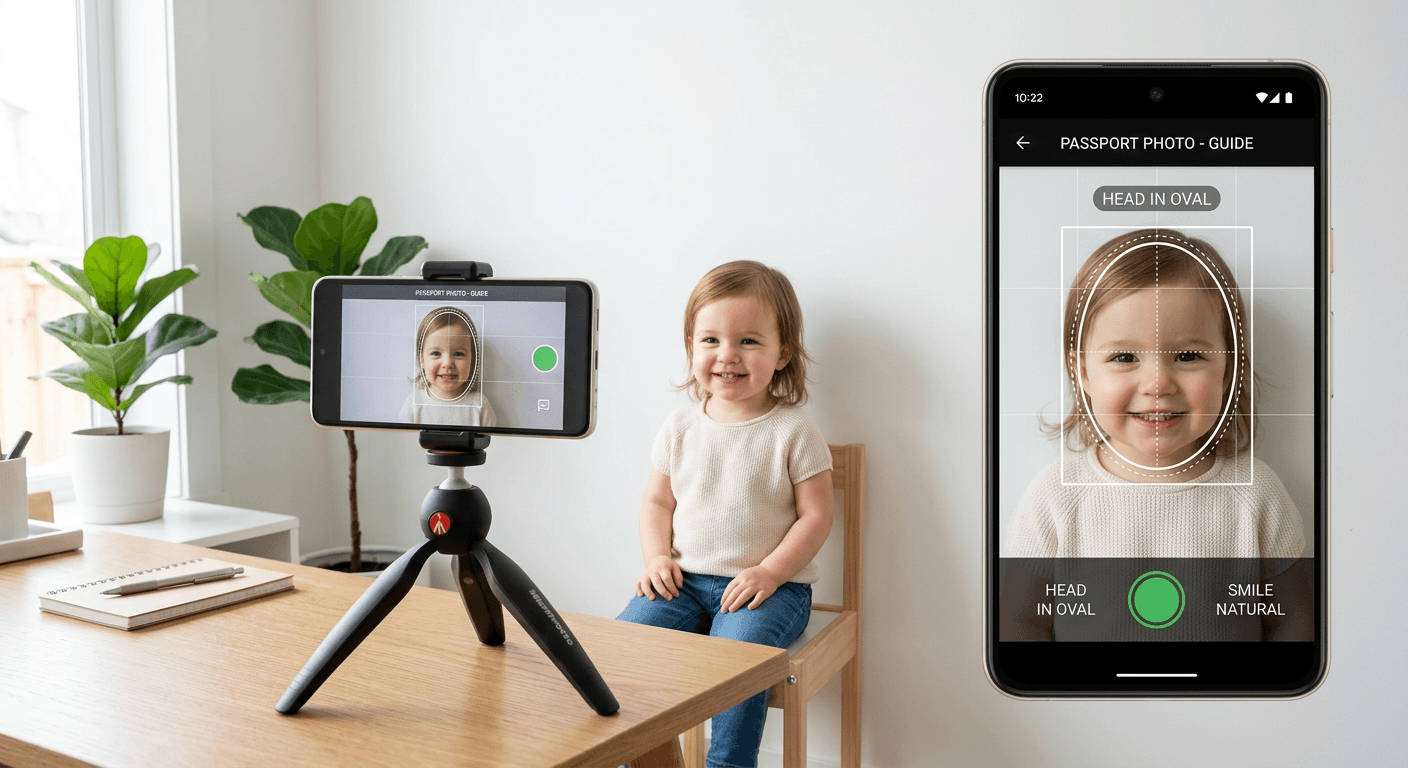
Creating compliant identification images has transitioned from the high-street studio to the convenience of the home environment. As biometric standards become more rigorous, the demand for a reliable passport photo app that balances ease-of-use with strict regulatory adherence has grown. Whether you are preparing documents for a newborn or renewing an adult passport, modern software solutions now automate the complex tasks of background removal, head-size verification, and lighting correction to ensure your application is not rejected at the first hurdle.

Quick Summary
A passport photo app is a digital tool that enables users to capture, process, and format smartphone photographs to meet specific government biometric requirements. By utilising AI-driven algorithms, these services ensure that shadows, posture, and dimensions align with international standards, helping users avoid the costly delays associated with rejected applications.
- Automated compliance checks for head-size and alignment.
- Intelligent background removal to meet plain-colour requirements.
- Cost-effective printing options via standard retail photo kiosks.
- Time-saving solutions for photographing infants and young children.
Table of Contents
- Quick Summary
- Comparison of Digital Photo Solutions
- AI-Driven Web Platforms
- Specialised Mobile Passport Applications
- General Purpose Image Editors
- Buying Guide - How to Choose a Reliable Tool
- Frequently Asked Questions
- Recommended Reads
Comparison of Digital Photo Solutions
| Category | Key Features | Pros | Cons | Target Audience |
|---|---|---|---|---|
| AI-Driven Web Platforms | Automated biometric validation | High compliance accuracy | Requires internet access | Visa and Passport applicants |
| Mobile Passport Apps | Built-in camera guidance | Maximum convenience | Varies in algorithm quality | Busy parents & travellers |
| General Image Editors | Manual crop/resizing tools | Flexible usage | High risk of rejection | DIY enthusiasts |
AI-Driven Web Platforms
Dedicated online tools have become the industry standard for individuals who require professional-grade results without installing permanent software. These web-based services function by uploading an existing smartphone photo to a server that cross-references the image against a vast database of global government requirements. If you follow the official guide provided by these platforms, you can ensure that the file is not only sized correctly but also adheres to subtle requirements such as head-to-chin ratios and specific background luminance.
When using an online passport photo maker, users benefit from real-time feedback. Unlike manual editing, these platforms detect common failure points, such as subtle shadows behind the ears or eyes that are obscured by hair, before the image is finalised. This proactive approach to compliance is critical, as a minor oversight can lead to a rejected application, which can be particularly frustrating when applying for time-sensitive visas.
Specialised Mobile Passport Applications
A high-quality passport size app is designed to guide the user through the photography process in real-time. These applications often utilise the phone's sensor to provide a live overlay, ensuring the subject is correctly positioned before the shutter is even pressed. This is particularly useful when photographing infants, as the app can guide the parent on how to lie the child down safely on a neutral surface to achieve a compliant result.
These mobile tools often provide a 'print-ready' file layout. By generating a standard 4x6 inch template containing multiple copies of the photograph, these apps allow users to print at a standard photo kiosk for a fraction of the cost of traditional photography services. For further assistance on how these services protect your personal data during the upload process, it is advisable to review the platform's privacy policy.
General Purpose Image Editors
While general-purpose image editors offer the freedom to manipulate photos manually, they lack the specific biometric validation engines that distinguish a free passport photo maker from a professional-grade tool. These tools are often sufficient for basic resizing, but they place the entire burden of compliance on the user. If you use a general editor, you must manually ensure that the background is perfectly uniform and that no light-spill or distortion is present, which is rarely possible without expert knowledge of biometric standards.
Users who prefer to use general tools must be aware that authorities are increasingly strict about digital manipulation. Subtle brightening or skin-smoothing tools can be interpreted as 'altered' photographs, leading to immediate rejection. For those who feel unsure about the technical requirements, it is often safer to seek a professional service via contact channels provided by dedicated platforms to verify that your chosen method meets the current year's standards.
Buying Guide - How to Choose a Reliable Tool
Selecting the right passport photo online app requires attention to several technical details. First and foremost, check the tool’s database of country-specific requirements. Different nations have vastly different standards regarding ear visibility, glasses, and head size. A tool that does not offer country-specific templates is unlikely to produce a compliant document.
Secondly, consider the refund or support policy. If you are unsure about the legitimacy of a service, checking their refund-policy is a prudent step. A reliable tool should offer explicit guarantees regarding compliance. If a provider cannot ensure that their output will be accepted by official passport offices, the cost of a rejected application is far higher than the price of a more robust, guaranteed service.
Frequently Asked Questions
Can I use a free passport photo maker for my application?
Yes, provided the tool adheres to the specific biometric requirements of your country. Always check the output file for shadows and correct proportions.
Will an AI-generated photo be accepted by the passport office?
Provided the AI correctly adjusts the background and alignment to government standards, these photos are accepted globally. The key is ensuring the source photograph was taken with appropriate lighting.
How do I ensure my infant's photo is compliant?
Use a mobile app that offers specific guidance for children. Ensure the infant is facing the camera directly and that there are no shadows on their face or the background.