Everything You Need to Know About UK Passport Photos
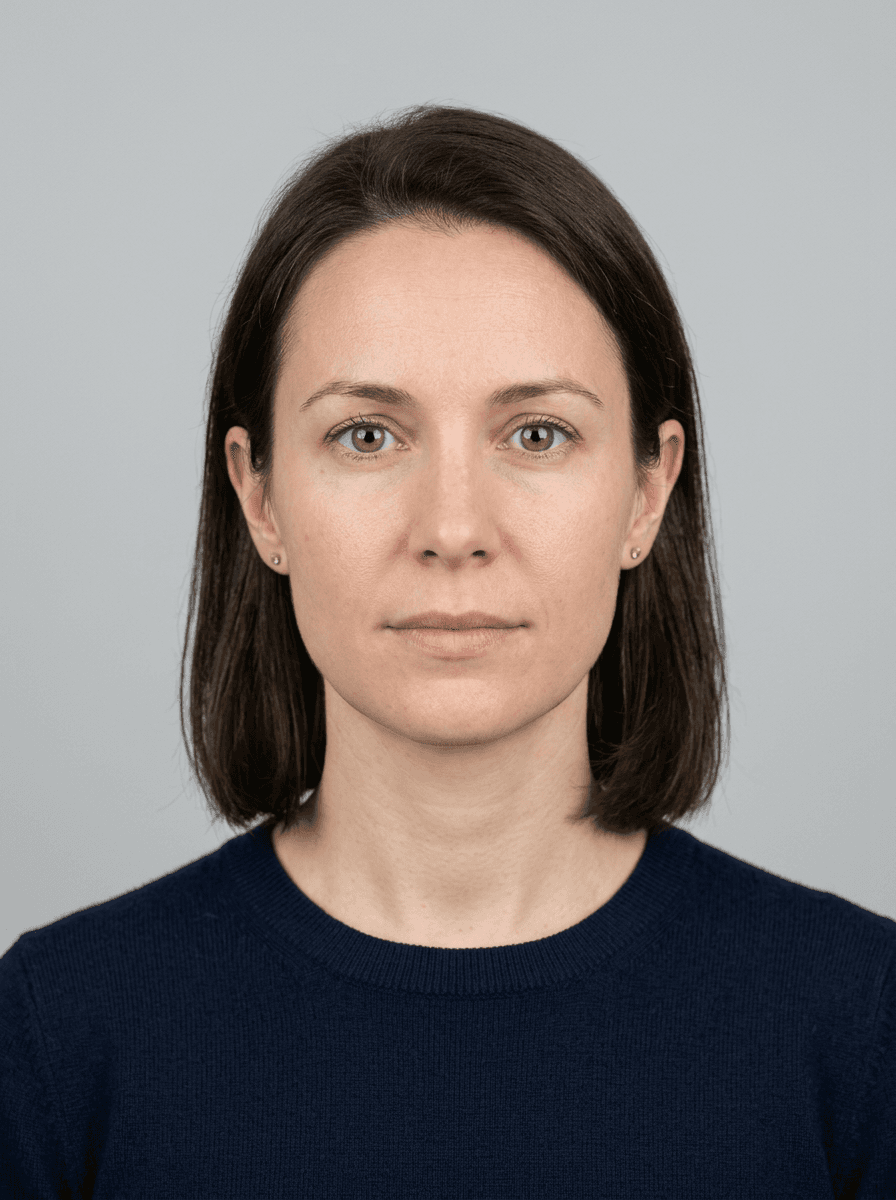
Applying for a travel document requires strict adherence to HM Passport Office guidelines, particularly regarding your passport photo uk requirements. Ensuring your image meets all technical and aesthetic standards is the most common hurdle in the renewal process, as non-compliant submissions lead to immediate delays or outright rejection of your application.
Quick Summary
A compliant British passport photo is a high-resolution, recent digital or printed image that meets specific biometric standards, including a plain light-grey background, neutral expression, and accurate lighting. It must be clear, in focus, and devoid of shadows, shadows, or obstructions to be accepted by the UK government.
- No glasses, hats, or head coverings (unless for religious or medical reasons).
- Eyes must be open, visible, and looking straight at the camera.
- Digital files must be between 50KB and 10MB in size.
- The subject's head and shoulders must be centered and fully visible.
Table of Contents
- Digital Standards for Passport Photos
- Lighting and Composition Requirements
- Common Rejection Causes
- The Process of Getting Photos Online
- Technical Specifications Breakdown
- Frequently Asked Questions
- Recommended Reads

Digital Standards for Passport Photos
When submitting a british passport photo in the modern digital age, the file must adhere to stringent technical parameters. The image must be a professional-quality digital file that is not a scanned copy of a physical photograph. The dimensions must be at least 600 pixels wide and 750 pixels tall, ensuring the clarity required for facial recognition software to process your identity accurately.
If you are considering a passport photo online free uk option, you must ensure the tool maintains these high-resolution standards without compression artifacts. Low-quality images often appear pixelated or blurry when uploaded to the official portal, which frequently results in automated rejection. If you encounter issues during this phase, it is advisable to consult the official help resources to verify your file format is compatible with the HM Passport Office servers.
Lighting and Composition Requirements
The composition of a valid passport photo is governed by precise rules regarding the subject's position and the surrounding environment. You must stand in front of a plain light-grey or cream-colored background. No shadows should be visible on the background or on your face, as these can interfere with the biometric mapping of your features.
Lighting should be uniform across your face. Many applicants fail because they use a light source from one side, creating high-contrast shadows that obscure facial features. Using a soft, frontal light source helps to ensure your skin tone is natural and your eyes are clearly defined. If you need assistance understanding these lighting principles, you can review the comprehensive passport photo guide to ensure your setup complies with government standards.
Common Rejection Causes
Rejections are rarely due to a single issue but rather a combination of small errors. The most common cause is the presence of "red-eye" or reflections on glasses. Even though you are required to remove glasses for most modern passport applications, any glare from jewelry or excessive makeup can also trigger a system alert. Your facial expression must remain neutral; smiling, frowning, or raising your eyebrows changes the shape of your face, which complicates the biometric scanning process.
Another frequent issue involves the framing of the image. The distance from the top of your head to the chin must occupy a specific percentage of the frame. If you take your own photo, ensure you do not tilt your head; maintain a straight, forward-facing posture. If your previous attempts have failed, you may want to review the terms of service to understand how to better manage your application documents.
The Process of Getting Photos Online
Utilizing a uk passport photo online platform can significantly streamline the renewal process. These platforms are designed to guide the user through the necessary steps to meet HM Passport Office requirements. They often include automated cropping tools that force the image into the correct dimensions, saving you the manual effort of resizing files in image editing software.
Pro Tip: When using an online tool, ensure you are standing in a well-lit area with a plain wall behind you. Even the best software cannot compensate for poor lighting or a cluttered background, so a clean setup is the foundation of a successful upload.
These platforms often provide a validation check, comparing your submitted photo against the government's technical requirements. Before submitting, it is always a good idea to check the privacy policy of the service you choose to ensure your biometric data remains protected throughout the processing cycle.
Technical Specifications Breakdown
| Specification | Requirement | Impact on Acceptance |
|---|---|---|
| File Format | JPEG | Mandatory for online portal |
| File Size | 50KB - 10MB | High impact; prevents errors |
| Resolution | 600 x 750 pixels | Essential for biometrics |
| Background | Plain, light grey | Prevents contrast issues |
| Pose | Forward-facing | Critical for facial recognition |
Maintaining these standards is non-negotiable. While the market offers a wide variety of ways to capture a british passport photo, the final digital output must remain objective and clear. If you find your files are consistently rejected despite your best efforts, you might consider reaching out to a professional service through their contact page for personalized troubleshooting.
Frequently Asked Questions
Can I wear glasses in my passport photo? No. You must remove your glasses for the photo to avoid reflections and frames obscuring your eyes. Even non-tinted frames are generally rejected.
What if I need a head covering for religious reasons? Head coverings are permitted for religious reasons, provided they do not cast shadows on your face and your full facial features from the bottom of your chin to the top of your forehead remain visible.
Can I use an old photo? No. The photo must be taken within the last month. It must be a true reflection of your current appearance to ensure border control can verify your identity.
What is the best way to get a free UK passport photo? While you can use a smartphone, you must ensure the lighting and composition are perfect. Using an online tool to verify the dimensions is a smart way to ensure compliance before you pay for your application fee.