How to Ensure Your Passport Photo Remains Valid During Document Renewals
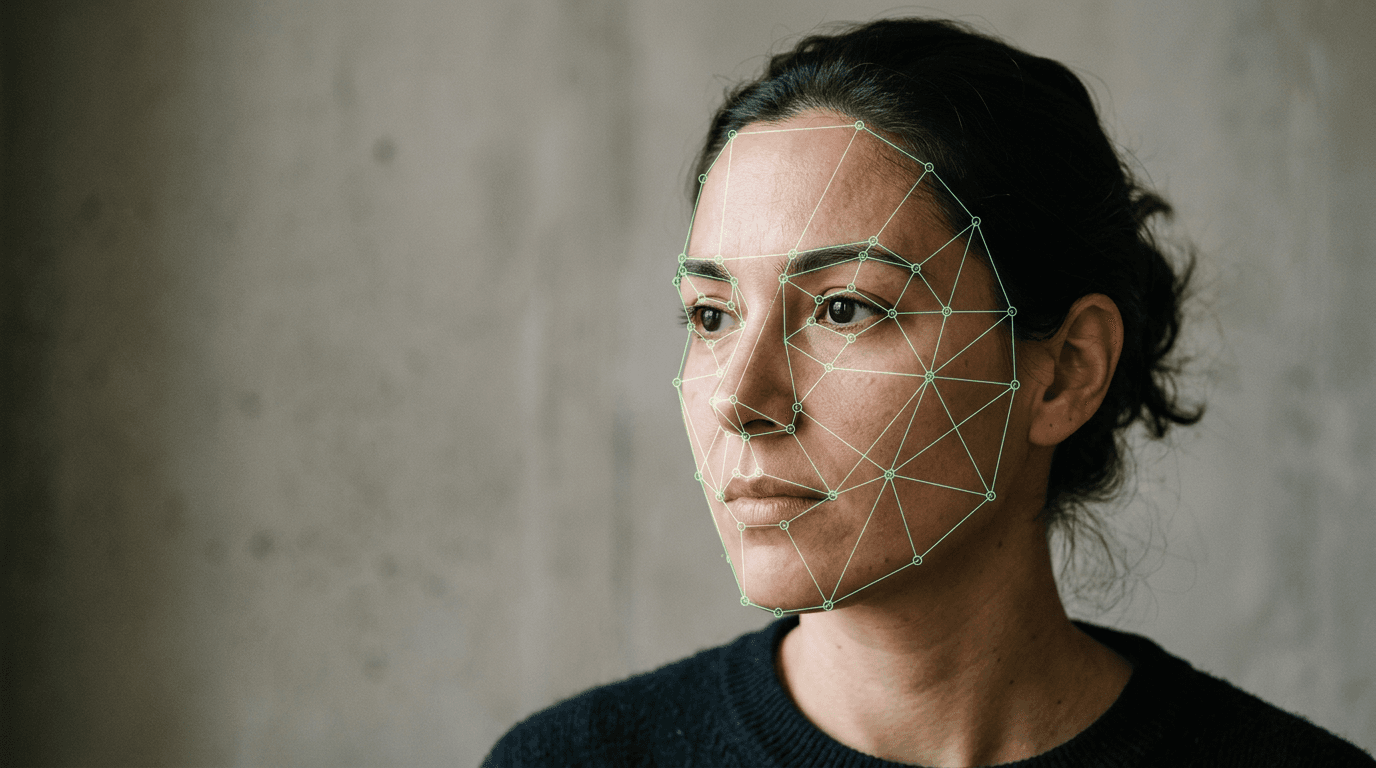
A digital image submitted to HM Passport Office is checked against an algorithm that measures over 20 specific biometric points, mapping the precise geometry of a face before a human ever looks at the file. A compliant passport photo is not merely a picture; it is a biometric dataset masquerading as a photograph. When applicants attempt to carry over older imagery into new applications, they routinely fail because they treat the image as a visual likeness rather than a technical specification. Understanding the mechanical boundaries of document imagery prevents costly application delays, particularly when crossing international borders where standards suddenly shift.
Quick Summary
Biometric document imagery operates under strict technical parameters defined by international aviation standards, measuring facial geometry, digital metadata, and lighting uniformity. Reusing or improperly updating these images triggers automated rejection algorithms.
- Digital validation systems check EXIF metadata to ensure images were captured within the last 30 days.
- Infant biometric requirements differ mechanically from adult standards, requiring distinct lighting and positioning.
- Different document types (visas, passports, driving licences) enforce conflicting background and dimension rules.
- Physical alterations to facial geometry necessitate mid-cycle photograph updates to remain compliant.
Table of Contents
- Why biometric drift ruins your passport renewal online
- Where different document types diverge on image lifespan
- How infant facial changes trigger early rejection
- What breaks first when you reuse a passport id photo
- When you must change passport photo details mid-cycle
- How digital validation catches a reused passport update photo
- FAQ
- Recommended Reads
Why biometric drift ruins your passport renewal online
The core of modern travel documentation relies on the standards set by the International Civil Aviation Organization (ICAO), specifically Document 9303. This standard dictates that a facial image must allow facial recognition software to measure the distance between the pupils, the width of the mouth, the curve of the jawline, and the spatial relationship between the nose and the chin. When you submit a passport renewal online, the government portal runs the uploaded file through an automated pre-flight check designed to locate these specific markers.
Biometric drift occurs when the natural aging process alters these measurable distances. While the human eye easily compensates for weight fluctuations, wrinkles, or skin tone changes, an algorithm relies on strict pixel mapping. If an applicant attempts to submit an image taken a year ago, they assume the visual similarity is sufficient. However, the algorithm maps the geometry against the previously held record and current standard constraints. If the software cannot cleanly establish the inter-pupillary distance due to slight off-axis rotation or marginal lighting changes, it flags the image for manual review or outright rejection.
The mechanism of failure here is often lighting rather than facial geometry. A photo taken in a standard room lit by an overhead bulb creates microscopic shadows under the eyes and chin. To the algorithm, a shadow is interpreted as a physical boundary of a facial feature. This artificial boundary shifts the calculated geometry, causing a mismatch. This is why strict, uniform lighting is mandated: it removes the false edges that shadows create, allowing the software to measure the actual face rather than the shape of the light falling upon it.
Where different document types diverge on image lifespan
Different governmental bodies apply varying tolerances to biometric data, meaning an image perfectly acceptable for one document will automatically fail for another. The primary divergence lies in background colour, head size proportions, and the required recency of the capture.
A UK passport requires a 35x45 mm physical print (or equivalent digital ratio) set against a plain cream or light grey background. In contrast, a US visa mandates a 2x2 inch square format against a stark white background. If an applicant submits a UK-compliant grey-background image to a US system, the software cannot separate the foreground from the background cleanly, as its contrast threshold is calibrated for pure white.
Furthermore, the accepted lifespan of an image varies strictly by document category. Most national passport authorities demand an image captured within the last month. Driving licence authorities, however, often allow applicants to pull their existing passport image directly from the national database, effectively resetting the image's validity for domestic identification purposes.
Specifications Comparison Table
| Document Type | Standard Dimensions | Typical Validity | Image Age Limit | Background Requirement |
|---|---|---|---|---|
| UK Passport | 35x45 mm | 10 years (Adult) | 1 month | Light grey or plain cream |
| US Visa | 2x2 inches (51x51 mm) | Varies | 6 months | Pure stark white |
| Schengen Visa | 35x45 mm | Varies | 6 months | Light grey or white |
| UK Driving Licence | 35x45 mm | 10 years | Linked to passport | Light grey or plain cream |
These constraints mean that batch-processing photos for multiple upcoming applications is functionally impossible if the applications cross jurisdictional lines. You cannot rely on a single file to satisfy both a domestic passport and an international visa if the target countries operate on different contrast algorithms.
How infant facial changes trigger early rejection
Infant biometric photography is fundamentally distinct from adult photography because the subject lacks the motor control to comply with standard positioning. A newborn's cranial structure changes rapidly in the first few months of life, meaning the biometric mapping of a four-week-old is drastically different from that of a six-month-old.
Government algorithms are temporarily adjusted for infant submissions. For example, children under the age of one are generally exempt from the strict "eyes open" requirement, as forcing a newborn to maintain open eyes while staring directly at a lens is often impossible. Similarly, children under six are permitted to have a non-neutral expression, accommodating natural mouth-breathing or involuntary smiling.
However, the tolerance for background interference remains absolute. The most common failure mode for an infant application is the presence of a parent's hand supporting the child's head, or the visible texture of a car seat or blanket behind them. The software cannot distinguish between a supporting finger and a facial anomaly, leading to a rejected file. The correct mechanism is to lay the infant flat on a plain, light-coloured sheet, shooting from directly above to eliminate shadows and background noise. Understanding these specific exemptions and rigid boundaries is critical; you can read more about navigating the international photo requirements and guides before you submit an application to ensure the file will pass the automated checks.
Practical rule: When photographing an infant from above, ensure the primary light source is bouncing off the ceiling rather than pointing directly downward. Direct overhead light casts the photographer’s own shadow across the infant's face, triggering an automatic algorithmic rejection for uneven contrast.
What breaks first when you reuse a passport id photo
Attempting to recycle an older passport id photo for a new application introduces a cascade of technical failures that are invisible to the naked eye but glaringly obvious to an upload portal. The first element to break is the image file's EXIF metadata.

Every time a smartphone or digital camera captures an image, it writes a hidden ledger of data into the file itself. This EXIF data includes the exact date and time of capture, the device used, and the exposure settings. Government portals explicitly extract this metadata during the upload process. If the DateTimeOriginal tag indicates the image is older than 30 days, the portal will instantly reject the file before it even attempts a biometric scan.
The second failure mode involves digital degradation through repetitive saving. When a user downloads a previously used image from an old email or social media account and crops it for a new application, the file undergoes JPEG compression. This compression groups similar pixels together to save space, creating "artifacts" - blocky, pixelated edges around high-contrast areas like the jawline and the hairline.
While these artifacts might blur away on a small smartphone screen, the government's cropping tool aggressively zooms in on the face to map the biometric points. At this magnification, the compression artifacts look like jagged physical edges, causing the inter-pupillary measurement to fail. For users struggling with repeated portal rejections due to file degradation, checking the help center for guidelines on native resolution and file handling is a necessary step to diagnose the exact cause of the compression.
When you must change passport photo details mid-cycle
A standard adult passport remains valid for ten years, during which time the holder will naturally age, change hairstyles, and perhaps gain or lose weight. These natural, gradual changes do not invalidate the biometric data, and authorities do not require you to update the imagery to reflect them. The underlying bone structure remains identical, and border control facial recognition systems easily map past cosmetic changes.
However, you must actively change passport photo records mid-cycle if your facial geometry undergoes a sudden, significant alteration. This is not about vanity; it is about the mathematical model of your face. If you undergo significant reconstructive facial surgery, sustain severe facial trauma that alters your jawline or nose structure, or transition to a different gender, your previous biometric map will no longer correspond to the physical face presented at the border.
In these specific scenarios, the automated border control gates (e-gates) will fail to match the live camera feed to the RFID chip in the passport. This forces a manual intervention by a border agent. If the agent determines that the physical disparity is severe enough to cast doubt on your identity, you may be denied boarding or entry. The threshold for a required change is strict: growing a heavy beard or dyeing your hair does not trigger a requirement for a new document, but altering the fixed points of your cranial structure does. You should treat the image not as a portrait, but as a barcode; if the barcode is damaged or altered, the scanner cannot read it.
How digital validation catches a reused passport update photo
When a government instructs you to supply a new image, they deploy hashing algorithms to guarantee compliance. A hash is a unique alphanumeric string generated by passing the file's data through a cryptographic function. Every image file produces a unique hash.
If you submit a passport update photo that is functionally the same image you used three years ago - even if you have stripped the EXIF data, slightly cropped it, or subtly altered the brightness - the core geometry remains mathematically identical. The system compares the new file against the historical database of your previous applications. If the biometric geometry matches the old file with too high a degree of certainty (accounting for the lack of natural aging or microscopic shifts in posture), the system flags the submission as a duplicate.
This is particularly relevant for users who scan a physical print of an old photo to bypass digital checks. Scanning a print introduces physical texture into the file. The scanner picks up the microscopic halftone dots of the ink or the physical grain of the photographic paper. The validation algorithm detects this uniform pattern as digital noise and categorises the file as a "reproduced image" rather than an original capture, leading to an immediate halt in processing. Understanding the technical limitations of your submission is vital; reviewing the terms & conditions of any digital processing platform will clarify precisely what file types and origins are acceptable for final submission.
Practical rule: Never attempt to scan a physical photograph to create a digital submission file. The automated software will detect the paper grain and ink dots, interpreting them as an invalid filter or artificial manipulation, resulting in an automatic rejection.
The mechanics of document validation are unforgiving by design. Treating the capture process as a strict data-gathering exercise, rather than a portrait session, is the only reliable way to ensure your documents pass the automated gates without delay.
FAQ
Can I smile in my passport picture?
No. You must maintain a neutral expression with your mouth closed. Smiling shifts your facial features, altering the geometric distances between your mouth, nose, and jawline, which causes biometric software to fail.
Do I need a new photo if I grow a beard or wear glasses?
Growing a beard does not alter your underlying bone structure, so a new image is not required. However, you must remove glasses for all new applications, as the frames obscure the orbital bone and lenses cause reflections that blind the scanning algorithms.
Why was my smartphone photo rejected for being too close?
Smartphone lenses are typically wide-angle. If you hold the phone too close to your face, it causes barrel distortion, making your nose appear larger and your ears smaller. This warps the biometric map. Photos must be taken from roughly 1.5 metres away and zoomed in.
Can I wear makeup in the photo?
Subtle makeup is permitted, but heavy contouring is strictly forbidden. Contouring artificially changes the shadows on your face, which the algorithm misinterprets as your actual bone structure, leading to a biometric mismatch at border control.