Decoding India Passport Photo Requirements for Physical and Digital Submissions
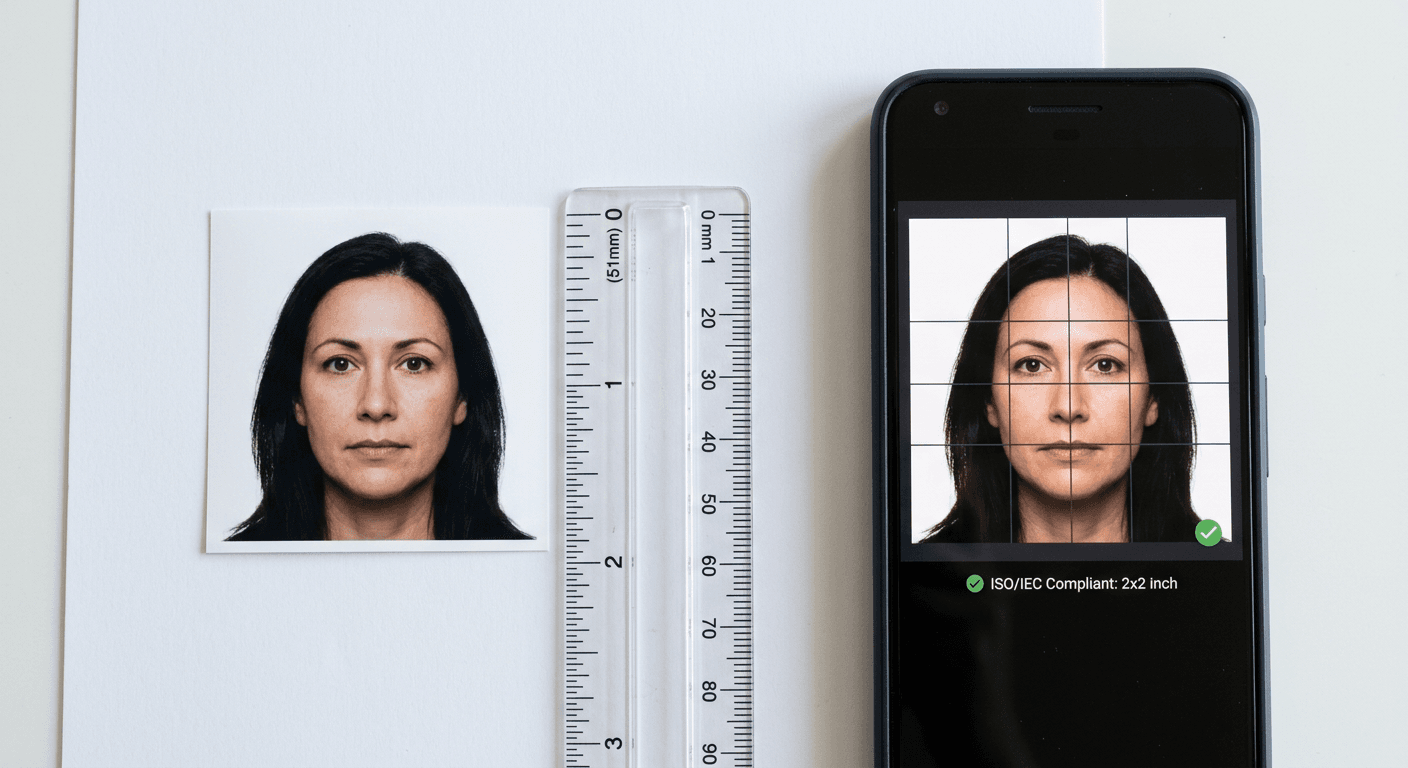
Most applicants assume a standard European or UK passport photo will work for an Indian consulate application, only to find their submission rejected at the desk or blocked by the upload portal. The Indian High Commission and the central Passport Seva system enforce a strict two-by-two-inch square format, entirely distinct from the standard 35x45mm rectangle used across most of Europe. Meeting the India passport photo requirements means understanding that both the physical print and the digital file are subjected to rigorous biometric geometry checks before an application is even assigned to an official for review.
Quick Summary
The standard for Indian travel documents dictates a strict 2x2 inch (51x51 mm) square format set against a plain white background. Both physical prints and digital uploads must meet exact facial coverage ratios, meaning standard UK or Schengen sizes are automatically rejected by processing systems.
- Physical prints must measure exactly 51x51 mm.
- The face must occupy the majority of the total frame height, leaving visible space above the crown and below the chin.
- Digital file uploads require an exact 1:1 aspect ratio, typically 200x200 to 300x300 pixels.
- File sizes for the Passport Seva portal must strictly sit between 10KB and 100KB.
- Infant photos must be entirely free of adult hands, props, or visible supports.
Table of Contents
- Why the India passport photo requirements cause immediate portal rejections
- Where standard India passport photo dimensions catch applicants out
- How digital formats fail during online Indian passport renewal
- Why lighting and background rules differ from European standards
- What complicates infant and newborn submissions
- Which printing methods preserve biometric data
- Who should skip retail photography kiosks
Why the India passport photo requirements cause immediate portal rejections
The architecture of Indian consular processing relies heavily on automated initial screening. When an applicant uploads an image or hands over a physical photograph at a VFS Global desk, the image is not merely looked at by a human; it is scanned and parsed by facial recognition software. This software demands a specific geometry to map facial landmarks - the distance between the pupils, the width of the mouth, and the length from the chin to the crown of the head.
If the submitted image uses the European 35x45mm format, the bounding box the software uses to locate these landmarks is instantly thrown off. The system expects a perfect square. When a rectangle is forced into a square upload field, the image either stretches - distorting the biometric distance between the eyes - or leaves white space on the sides, which the system flags as an incorrect background. Understanding international baby passport photo requirements or adult specifications means recognising that the file format is just as vital as the subject's expression.
| Specification Category | Physical Print Requirement | Digital Upload Requirement (Passport Seva) |
|---|---|---|
| Overall Size | 2 x 2 inches (51 x 51 mm) | Minimum 200 x 200 pixels, Maximum 300 x 300 pixels |
| Aspect Ratio | 1:1 (Square) | 1:1 (Square) |
| Background | Plain white only | Plain white only |
| File Size / Quality | High-resolution continuous tone | 10KB to 100KB, standard JPEG format |
| Head Height | 25 mm to 35 mm | 70% to 80% of the vertical pixel count |
Where standard India passport photo dimensions catch applicants out
The fundamental metric that causes physical rejections is the internal proportion of the face relative to the outer edge of the photograph. The correct India passport photo dimensions are 51x51 mm overall, but this outer boundary is only the first constraint.
Within that square, the head - measured from the bottom of the chin to the uppermost point of the hair - must measure between 25 mm and 35 mm. Furthermore, the eyes must be positioned vertically between 28 mm and 35 mm from the bottom edge of the photo. This eye-level requirement ensures that the camera on the other end of the scanning machine knows exactly where to look for the primary biometric markers.
When a standard UK photo is manually trimmed with scissors to make a square, the head size usually ends up being too large for the frame. A UK photo mandates a head size of 29 mm to 34 mm inside a much smaller 35 mm wide box. Trimming it down leaves the face dominating nearly the entire image, violating the Indian requirement for visible shoulder and background space above the head.
Practical rule: Measure your printed photograph with a clear plastic ruler before submission. If the distance from the bottom edge of the paper to the pupil of the eye is less than 28 mm, the facial framing is too low and the application will be flagged.
How digital formats fail during online Indian passport renewal
Navigating the digital upload portal requires balancing image resolution against severe file size constraints. When managing an online Indian passport renewal, applicants are instructed to upload a digital photograph in JPEG format. The Passport Seva portal is notorious for its rigid validation scripts. The file size must be greater than 10KB but cannot exceed 100KB.
Modern smartphones naturally shoot images that range from 2MB to 5MB. Simply resizing the image dimensions to 300x300 pixels without adjusting the compression often results in a file that still sits around 150KB, triggering a rejection error. Conversely, aggressively compressing a high-resolution smartphone image using basic web tools can introduce compression artefacts - blocky, pixelated distortions around the edges of the nose and eyes. Because the Indian biometric algorithms rely on sharp edge detection to measure facial features, these artefacts cause the automated system to read the photo as blurred.
Using dedicated platforms for generating compliant passport photos from home allows the underlying software to manage the compression algorithms. These systems strip unnecessary EXIF metadata from the file - such as geolocation and camera model data - which can quietly bloat a small image file by 20KB or more, leaving more data allowance for the actual visual quality of the face.
Why lighting and background rules differ from European standards
The Indian standard requires a stark, unbroken white background. This is a notable departure from the UK standard, which explicitly permits cream or light grey backgrounds. The Indian specification demands plain white so that the contrast between the applicant's hair, shoulders, and the background is absolute.
This high-contrast requirement creates a secondary failure mode: clothing choices. If an applicant wears a white shirt or a very pale grey blouse against the mandatory white background, the image processor struggles to identify the outer boundary of the shoulders. The algorithm needs to separate the subject from the background to run its geometry checks. Without a clear shoulder line, the software determines that the head is floating or the body is improperly framed, resulting in a failed check.
Lighting poses another strict hurdle. Flash photography often creates a drop shadow directly behind the subject's neck or off to one side. The Indian specification treats any background shadow as an obstruction. When troubleshooting common passport photo errors, eliminating harsh directional light in favour of flat, diffuse natural daylight is the most reliable fix. Stand facing a window, not with the window to the side, to ensure both halves of the face are illuminated equally without casting a silhouette on the wall behind.
What complicates infant and newborn submissions
Capturing an acceptable image of a newborn or infant is where the strict rules meet the chaotic reality of human development. The Indian consulate requires the child to be looking squarely at the camera with their eyes open and mouth reasonably closed. For an infant under six months old, achieving a closed mouth and open eyes simultaneously while maintaining the perfect 51x51 mm framing is difficult.
While European guidelines sometimes offer leniency for newborns regarding closed eyes, the Indian standard is notoriously rigid. If a child's eyes are heavily hooded or shut, the biometric software cannot measure the interpupillary distance, and the photo is discarded.
The most frequent cause of infant photo rejection, however, is background contamination. Parents often try to support a child's head with their hands. If a parent's finger, knuckle, or even a piece of their clothing appears anywhere in the frame, the application is voided. The software registers the extra skin tone and halts the process.
Practical rule: Place the infant on a firm surface covered entirely by a plain white bedsheet, shooting directly downward from above. Ensure no toys, pacifiers, or supporting cushions cast shadows across the sheet.
Because the rejection rate for babies is exceptionally high, choosing a processing route that includes a 100% money-back guarantee on biometric rejections provides a necessary buffer against the unpredictability of consular decisions.
Which printing methods preserve biometric data
For physical submissions at VFS Global or consular camps, the material on which the image is printed matters just as much as the image itself. The Indian High Commission stipulates that photos must be printed on high-quality photographic paper with a continuous tone.
Printing a photo on standard office A4 paper using a laser or inkjet printer will be instantly rejected. Office paper absorbs ink and scatters it, destroying the sharp edges required for facial recognition. Furthermore, the paper finish is critical. While glossy paper is widely available, many consular staff prefer matte or semi-matte finishes. When a glossy photo is placed under the glaring lights of a flatbed scanner at the consulate, the surface reflects the scanner bar, creating a white streak across the applicant's face in the digitised file. Matte paper absorbs the scanner light evenly, preserving the integrity of the biometric data.
Applicants also struggle with how to supply a 51x51 mm print. A standard consumer photo printing block is 4x6 inches (10x15 cm). Two 2x2 inch square photos fit perfectly side-by-side on a 4x6 inch template, leaving an inch of white space to spare. However, building this layout requires specific software; simply sending a 2x2 inch file to a high-street printer usually results in the image being stretched to fill the entire 4x6 sheet.
Who should skip retail photography kiosks
Automated high-street photography booths are designed entirely around the domestic passport market of the country they sit in. In the UK, these machines are hard-coded to produce a sheet of four 35x45 mm rectangles set against a grey background.
Applicants requiring the standard Indian passport photo size should not attempt to use these booths. Even if a machine offers a "US/India" 2x2 inch setting, the physical environment inside the booth works against the applicant. The camera sits extremely close to the subject, forcing a wide-angle focal length that naturally distorts the centre of the face, making the nose appear larger and pushing the ears backward.
Furthermore, for parents of infants, these booths are entirely non-viable. There is no flat space to lay a baby down, and holding a child up to the lens inevitably introduces shadows, improper background colours, or the parent's hands into the frame. For those needing exact specifications for international documents, relying on technology behind automated biometric verification rather than fixed physical booths ensures that both the digital geometry and the physical print outputs align perfectly with the destination country's legal requirements.
FAQ
Can I wear glasses in my Indian passport photo? No. The Indian government explicitly forbids the wearing of spectacles in passport and visa photos. Even if the frames are thin or the lenses are anti-reflective, glasses obscure the exact contour of the eye socket and cause automated rejections.
Do my ears need to be visible? Yes. Hair should be tucked behind the ears so that the edges of the face and the ears are clearly visible. This allows the biometric software to measure the full width of the head accurately.
Is a light grey background acceptable if I don't have a white wall? No. The background must be pure, stark white. Grey, cream, or off-white backgrounds will fail the digital contrast checks, especially if you are wearing dark clothing.
Can I smile in the photograph? No. You must maintain a neutral expression with your mouth closed. Smiling alters the natural resting distance between the mouth and the chin, which skews the geometric data required for facial recognition.