The Technical Divide in Visa and Passport Photo Compliance
Picture the exact moment you slide your meticulously prepared application across the consulate desk, infant balanced on your hip, only for the official to reject the paperwork instantly. You submitted the identical image that passed your domestic passport office just weeks prior, yet the embassy denies it because the crown-to-chin ratio violates their distinct biometric rules. Securing a compliant visa passport photo means navigating a fiercely pedantic landscape of global regulations, where a shadow under the chin or a millimetre of extra background determines whether a family boards their flight or starts the application process over.
Quick Summary
A compliant biometric photograph must meet rigid international specifications regarding facial proportion, lighting geometry, and background colour. While many travellers assume a single standardised image will suffice globally, competing national regulations mean applicants frequently require distinct digital files for different jurisdictions.
- The United Kingdom mandates cream or light grey backgrounds to ensure edge contrast, explicitly rejecting pure white.
- United States and Indian authorities enforce a square two-by-two-inch layout with unique head-height percentages.
- Automated biometric scanners instantly reject images featuring asymmetrical lighting, background shadows, or artificial software manipulation.
- Infant applications permit closed eyes and relaxed expressions but strictly forbid visible hands, pacifiers, or supporting parents in the frame.
Table of Contents
- Why a visa passport photo is rarely a single file
- Where dimension standards diverge for international travel
- Background colours dictate which consulate accepts the image
- How infant biometrics change the compliance rules
- What fails first at the application counter
- Digital upload specifications versus physical print demands
- FAQ
- Recommended Reads
Why a visa passport photo is rarely a single file
The foundational framework for global travel documents is governed by the International Civil Aviation Organization (ICAO). Their Document 9303 outlines how a two-dimensional photograph must function as a machine-readable biometric map. However, this document provides a baseline, not a universal template, meaning individual nations build entirely different software parameters on top of it.
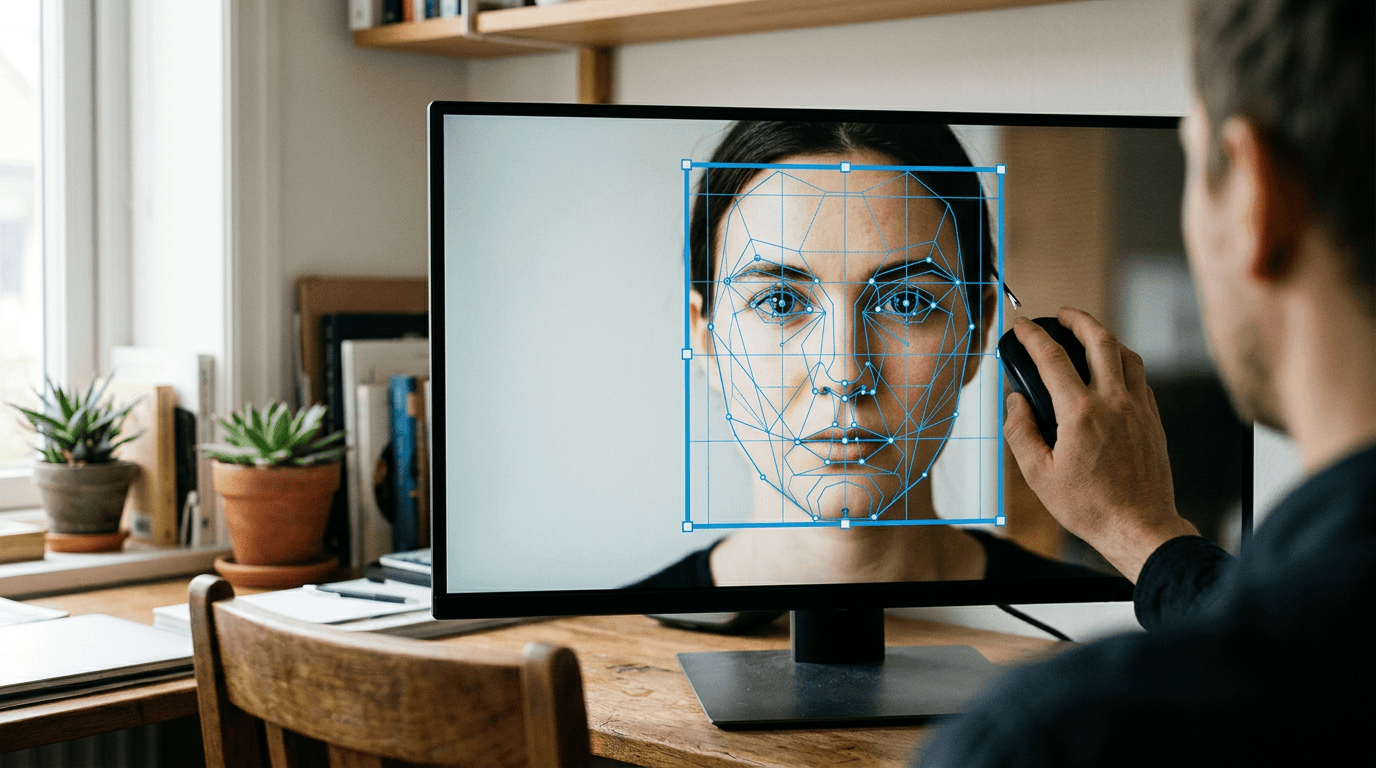
When a digital image is uploaded to a government portal, automated facial recognition software immediately searches for structural anchor points. The system maps the inter-pupillary distance (the exact gap between the centres of the eyes) and creates a geometric triangle down to the centre of the lips. The software then calculates the distance from these anchor points to the physical borders of the photograph. If the image is cropped too tightly or too loosely, the mathematical ratio collapses, and the scanner issues an automatic rejection before a human official ever reviews the file. Automated platforms such as the UK Baby Passport Photo Maker map these critical facial geometries to ensure the ratios align with specific national databases.
Because every country calibrates its scanners to expect a different distance between the face and the edge of the paper, an image perfectly scaled for a British application will systematically fail a North American scan. The facial mapping will appear either magnified or shrunken to the foreign software. You can check your own file's viability by drawing a horizontal line across the eyes in a printed draft; if that line does not sit exactly halfway between the top of the head and the bottom edge of the chin, the underlying biometric geometry is likely flawed and requires recropping.
Where dimension standards diverge for international travel
The physical dimensions of the photograph are the most immediate visual differentiator across application types. Preparing passport and visa photos means producing multiple aspect ratios from a single original capture, as attempting to stretch or squeeze an image to fit a new box distorts the applicant's facial width.
The United Kingdom, alongside Australia and the Schengen Zone, operates on a standard rectangular dimension of 35 millimetres wide by 45 millimetres high. However, the United States and India mandate a square format measuring 51 by 51 millimetres (two by two inches). The internal spacing rules are equally rigid. A UK image requires the head to measure between 29 and 34 millimetres from the crown to the chin. In a US image, the head must occupy between 50 and 69 percent of the total vertical space.
| Standard Type | Outer Dimensions | Background Colour | Minimum Head Height | Maximum Head Height |
|---|---|---|---|---|
| UK Applications | 35 x 45 mm | Light grey or cream | 29 mm | 34 mm |
| Schengen Visa | 35 x 45 mm | Light grey or white | 32 mm | 36 mm |
| US Visa | 51 x 51 mm | Pure white | 25 mm | 35 mm |
| Indian Visa | 51 x 51 mm | Pure white | 35 mm | 40 mm |
Practical rule: Never use a digital scaling tool to stretch a 35x45mm image into a 51x51mm square; you must return to the original uncropped photograph and cut a new square ratio to preserve the biometric width of the face.
Background colours dictate which consulate accepts the image
The backdrop behind the applicant is a heavily regulated technical element, entirely dependent on the specific physics of the scanning hardware used by the destination country. When preparing a passport size photo for uk visa applications, applicants must use a light grey or cream background, explicitly avoiding pure white.

The mechanism behind this UK rule involves subsurface scattering and edge contrast. When a camera flash hits a pure white backdrop, the light bounces back into the lens. If the applicant has a pale complexion, this reflected light washes out the jawline and the edges of the ears, blending the face into the background. Because British biometric software relies on sharp edge-detection to separate the head from the backdrop, a pure white background causes the scan to fail.
Conversely, the United States requires a stark white background to create maximum possible contrast against dark hair and clothing, calibrating their edge-detection algorithms for high-contrast separation. Other jurisdictions introduce further complexity; Malaysia, for instance, requires a specific shade of blue.
When capturing an image at home, the physical distance between the subject and the wall dictates the background's shade. If a person stands flush against a white wall, their shadow will darken the background, turning a white wall grey. You can test your background compliance by converting the image to high-contrast black and white on your smartphone. If the outline of your jaw or hair disappears entirely into the background, the image lacks the necessary contrast for biometric software and will face rejection.
How infant biometrics change the compliance rules
Infant applications present a unique biometric challenge because standard photographic rules clash with early childhood physiology. Children under one year of age lack the cervical muscle control to sit upright in a standard photographic booth, and their facial proportions change rapidly, requiring a distinct set of regulatory tolerances.
Government guidelines generally relax the rules regarding facial expressions for newborns. While adults must maintain a neutral expression with eyes open and mouth closed, infants under twelve months are permitted to have their eyes closed or partially open. However, the mechanical rules regarding obstructions remain absolute. Pacifiers, hands (both the child's and the parent's), and supportive props must be completely absent from the frame.
The standard method for capturing an infant is laying the child on their back on a plain sheet. This introduces a specific failure mode: gravity. Laying an infant down presses the back of their head into the fabric, which can push the ears forward and alter the perceived width of the face. More critically, the overhead lighting in a typical home casts a harsh drop shadow directly beneath the neck and shoulders. Biometric scanners read dark shadows as physical objects or structural facial features, leading to immediate rejection. Before arranging a home photography session, parents should consult UK and international baby passport photo guides to ensure their lighting setup avoids these structural pitfalls.
Practical rule: Place rolled towels completely beneath the plain sheet to elevate the infant's head slightly, creating physical distance between the child and the background fabric to eliminate harsh, scanner-confusing drop shadows.
What fails first at the application counter
Rejections rarely occur because an image is simply unflattering; they happen because the digital file triggers an error code in the government's pre-screening software. Understanding exactly what breaks the scan allows applicants to evaluate their own images objectively.
The most common failure mode is asymmetrical lighting. This occurs when an image is taken next to a window, illuminating one side of the face while leaving the other in shadow. Biometric algorithms map the face in three dimensions by measuring light fall-off. If one cheek is darker than the other, the software interprets the face as structurally lopsided, failing the biometric check. The face must be illuminated evenly from the front.
The second major failure is artificial background removal. When users attempt to cut out a cluttered background using basic editing tools, the software often leaves a jagged, pixelated edge around the hair, known as aliasing. Government security systems are programmed to flag sharp, unnatural pixels as evidence of digital tampering or forgery. Developers of sophisticated biometric algorithms detail the edge-detection and feathering mechanisms on their About Us pages, explaining how professional software maps the alpha channel to preserve natural hair outlines without triggering security flags.
The third failure is specular glare, typically caused by oily skin, heavy makeup, or a harsh direct flash. A bright white spot on the bridge of the nose or the forehead obscures the skin texture and alters the perceived distance between the eyes. To verify your image, zoom in to 100 percent on the bridge of the nose on a standard computer monitor; if you see a pure white cluster of pixels with no visible skin texture, the lighting is too harsh and the file will likely be rejected.
Digital upload specifications versus physical print demands
The final hurdle in the compliance process is the delivery format. The technical requirements for uploading a file to a digital visa portal are entirely distinct from the specifications needed to print a physical photograph for a paper application.
Digital portals operate on strict kilobyte constraints and pixel dimensions. A digital US visa photo, for example, must be perfectly square, measuring at least 600 by 600 pixels, and the file size must not exceed 240 kilobytes. To meet this weight limit, the JPEG file must be compressed. However, aggressive JPEG compression introduces blocky artifacts around the eyes and mouth, which corrupts the biometric data. Commercial compliance tools generally outline their risk-mitigation guarantees in detailed 100% Refund Policy documentation, as balancing compression against data integrity is a highly technical process.
Physical prints require a minimum resolution of 300 dots per inch (DPI), though 600 DPI is standard for retaining the microscopic facial details required by physical scanners. When preparing to print at a high-street retailer, applicants typically generate a four-by-six-inch template containing multiple correctly scaled crops. If an applicant simply sends a single 35x45mm file to a standard commercial photo printer, the machine will often stretch the tiny image across the entire four-by-six-inch paper, destroying the file. You must verify the exact file weight in kilobytes before digital upload, and you must verify the exact millimetre height of the printed head with a physical ruler before submitting a paper application.
FAQ
Can I smile in a biometric photograph?
No. Smiling alters the physical geometry of your face by raising the cheeks, squinting the eyes, and changing the distance between the lips and the nose, which guarantees rejection by facial recognition software.
What happens if my infant's eyes are closed in the picture?
Most international standards, including the UK, permit infants under the age of one year to have their eyes closed. However, children older than twelve months must have both eyes open and clearly visible.
Am I allowed to wear my prescription glasses?
Generally, no. The US and UK both strictly prohibit glasses in biometric photos, even if worn daily, because glass lenses create specular glare and thick frames physically obscure the edges of the eyes.
Do I need special paper to print physical application photos?
Yes. Physical photos must be printed on high-quality, low-gloss or matte photographic paper (minimum 200gsm). Standard printer paper lacks the density required by official document scanners and will be instantly rejected.
Can I use a photo from my smartphone?
Yes, provided the smartphone captures the image without applying automated beauty filters, artificial portrait blurring, or digital zoom, all of which alter the raw pixel data and trigger tampering alerts.