Understanding Passport Size Photo Dimensions and Biometric Requirements
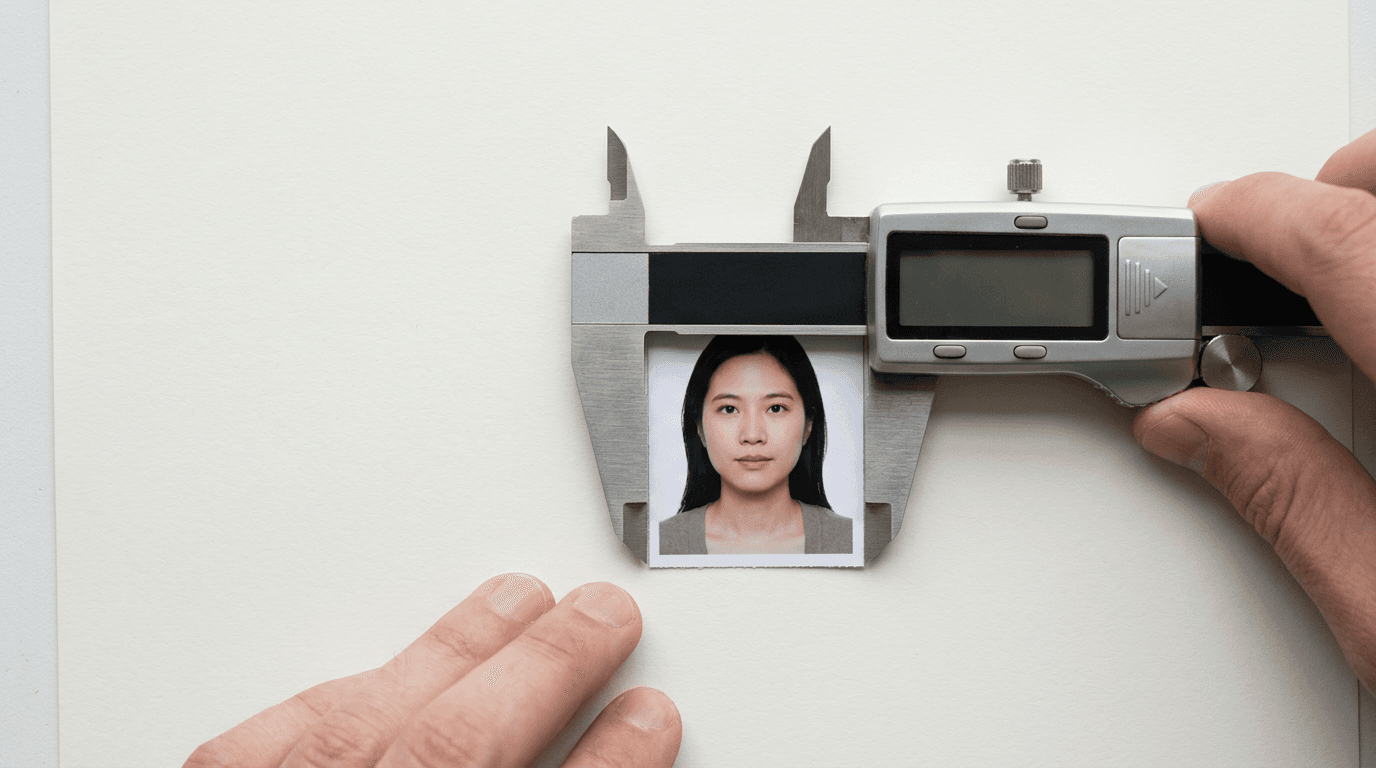
You open the envelope from the passport office, expecting a new travel document, but instead find a rejection letter stating the image failed biometric scanning because the crown of the head was two millimetres too close to the upper edge. The outer dimensions of the paper were perfectly cut, but the facial proportions within that frame triggered an automated refusal. The physical size of the paper is only the outermost boundary of a highly restrictive grid. Every modern travel document relies on automated facial recognition software, which demands absolute mathematical precision in how the face is positioned, scaled, and captured within that boundary.
Quick Summary
The exact passport size photo dimensions and internal facial proportions are strict mathematical parameters required by facial recognition systems to verify identity. Failing to meet these microscopic tolerances, particularly regarding head size and eye position, is the primary cause of application rejection.
- Standard UK and European dimensions are strictly 35mm wide by 45mm high.
- Internal measurements dictate the head must measure between 29mm and 34mm from crown to chin.
- International standards vary significantly, with the US requiring a 2x2 inch (51x51mm) format.
- Digital submissions require precise pixel dimensions and specific file size limits, alongside physical aspect ratios.
- Infant photography introduces unique measurement challenges due to head tilt and unsupported posture.
Table of Contents
- The Standard Passport Size Photo Dimensions
- Beyond the Outer Edge: Internal Passport Size Photo Measurements
- How the Passport Photo Size Standard Shifts Internationally
- Biometric Framing Challenges for Newborns and Infants
- Digital Resolution and Printing Templates
- Assessing Your Image Before Submission
- FAQ
- Recommended Reads
The Standard Passport Size Photo Dimensions
The baseline passport size photo dimensions for the UK, the European Union, and several other Commonwealth nations are fixed at 35 millimetres in width and 45 millimetres in height. This is not a rough guideline; it is a rigid mechanical requirement. When physical photographs are submitted, they are fed into optical scanners calibrated to accept this exact physical paper size.

If an image is cut manually and strays to 34mm or 36mm, the feeding mechanism in standard government processing hardware may misalign the scan. This misalignment skews the internal biometric data, causing an immediate automated rejection before a human assessor even views the file. The paper itself must be printed on high-quality photographic paper, completely free from creases, tears, or smudges, which the scanning software might misinterpret as facial scars or structural anomalies.
For digital applications, the physical 35x45mm requirement translates into specific pixel ratios. The UK government requires digital passport photos to be at least 600 pixels wide and 750 pixels tall, resulting in a file size between 50KB and 10MB. The aspect ratio must perfectly match the physical counterpart. If a user attempts to crop a standard smartphone image (which typically defaults to a 4:3 or 16:9 ratio) without applying the correct constraints, the image will stretch or compress when uploaded. Even a 2% artificial compression of a face alters the distance between the pupils, immediately invalidating the biometric signature.
Practical rule: Never use standard desktop scissors to trim a physical passport photo. The slight bevel and micro-tears created by standard blades can trigger rejection by high-resolution document scanners. Always use a dedicated precision photo punch tool or rely on professional guillotine cutters.
Beyond the Outer Edge: Internal Passport Size Photo Measurements
The outer boundary is merely the canvas; the true complexity lies in the internal passport size photo measurements. Facial recognition algorithms triangulate identity based on fixed anchor points: the distance between the pupils, the width of the nose, the position of the jawline, and the crown of the head. To ensure these algorithms can process the image, the face must occupy a highly specific percentage of the total image area.
In the UK 35x45mm standard, the subject's head, measured from the very top of the crown (excluding hair volume) down to the exact point of the chin, must measure between 29mm and 34mm. This leaves a vertical margin of error of just 5 millimetres. If the head is 28mm, the subject is deemed too far away, and the pupil-to-pupil pixel density is too low for the algorithm to extract a secure biometric map. If the head is 35mm, the image is rejected for being too close, often cutting off the necessary background space required to verify the outline of the skull.
Furthermore, the placement of the face within the frame is regulated. The eyes must be positioned horizontally and sit between 29mm and 35mm from the bottom edge of the photograph. The subject must be perfectly centred laterally, looking directly into the camera lens with a completely neutral expression. A slight rotation of the shoulders or a subtle tilt of the chin alters the two-dimensional mapping of the face. A chin tilted upwards extends the perceived distance from the nose to the jaw, mapping a facial structure that does not actually exist in the database.
How the Passport Photo Size Standard Shifts Internationally
Assuming that a compliant UK photograph will serve for international visa applications is a common and costly error. The passport photo size standard fractures wildly once you cross borders, driven by different legacy processing hardware and regional biometric database architectures. Submitting a 35x45mm photo for a US visa application will result in immediate refusal.
The United States Department of State requires a square format, strictly measuring 2 by 2 inches (51 by 51 millimetres). The internal measurements are equally distinct: the head must measure between 1 inch and 1 3/8 inches (25mm to 35mm) from the bottom of the chin to the top of the head. The eyes must sit exactly between 1 1/8 inches and 1 3/8 inches (28mm to 35mm) from the bottom edge of the photo.
Other jurisdictions introduce further complications. Canadian passport photos demand a 50mm wide by 70mm high physical print, with the face measuring between 31mm and 36mm in length. Unlike the UK, Canada also requires the physical print to bear the date the photo was taken and the stamp of a commercial photographer on the reverse side.
Navigating these varying dimensions requires exact specifications. Attempting to artificially expand a 35x45mm digital file to fit a 51x51mm square results in empty borders or a digitally skewed face. For families managing multiple international documents, maintaining distinct, accurately cropped files for each jurisdiction is mandatory. You can review the exact specifications for various jurisdictions in the comprehensive UK & International Baby Passport Photo Requirements & Guides documentation.
Biometric Framing Challenges for Newborns and Infants
The strict mathematical requirements of biometric photography collide violently with the physical realities of photographing infants. A government scanning algorithm makes no concessions for a newborn's inability to support its own head. The measurement rules regarding facial proportions, eye visibility, and centering apply with equal severity to a two-week-old baby as they do to a forty-year-old adult.
The primary failure mode in infant documentation is the collapse of the internal measurements due to head tilt. When a baby is laid on a flat surface to be photographed from above, the head naturally rolls to one side. Even a five-degree tilt throws the horizontal eye line out of parallel with the top edge of the photograph, resulting in a biometric failure. Furthermore, the crown-to-chin measurement is frequently obscured by the baby's chin resting against their chest, hiding the jawline and rendering the 29mm to 34mm vertical measurement impossible to calculate.
Shadowing is the second critical failure point. Overhead room lighting casts harsh shadows under the chin and around the eye sockets. Biometric scanners read dark shadows as physical facial features. A heavy shadow under an infant's chin artificially extends the perceived length of the jaw, breaking the proportional geometry of the face.
Parents often attempt to manually support the child's head, inadvertently introducing hands, fingers, or shadows into the frame. The background must be completely clear, plain, and light-coloured (typically pale grey or cream), with no other objects, people, or supportive props visible. Achieving this perfect isolation while maintaining the exact passport size photo dimensions requires specialised processing. This is where automated systems, such as the UK Baby Passport Photo Maker, apply algorithmic background removal and auto-cropping to isolate the infant's face and force it into the correct biometric grid without manual distortion.
Digital Resolution and Printing Templates
When transitioning from a digital file to a physical print, the concept of Dots Per Inch (DPI) becomes the governing metric. A digital image that looks perfectly sharp on a smartphone screen may print as a blurred, pixelated mess if the resolution is insufficient. Government standards universally require physical passport photos to be printed at a minimum resolution of 300 DPI.
If you have a digital file that meets the 600x750 pixel requirement, printing it directly at 35x45mm requires specific software formatting. A common mistake is sending a single 35x45mm digital file to a standard retail photo kiosk. The kiosk software, designed for standard holiday prints, will often attempt to stretch that tiny file to fill a standard 4x6 inch sheet of photo paper, destroying the image entirely.
To print physical copies cost-effectively, the single biometric image must be mapped onto a standard 4x6 inch (10x15cm) print template. A standard 4x6 sheet can comfortably hold four to six identical 35x45mm passport photos. However, the spacing between these images is critical. If they are placed too closely together, the automated guillotine at the passport office (or your own cutting tools) will clip the edges of the adjacent photos.
Practical rule: When generating a 4x6 inch print template, ensure there is a minimum of 5 millimetres of pure white space between each 35x45mm image. This provides a safe cutting bleed and ensures the outer dimensions remain mathematically perfect when separated.
If a printed image is rejected due to resolution degradation or incorrect template sizing, the financial and temporal costs of reapplying are significant. Utilising services that guarantee compliance and offer a 100% Refund Policy mitigates the risk of absorbing the costs of these highly technical printing failures.
Assessing Your Image Before Submission
Before submitting any image, whether digital or physical, a rigorous manual assessment against the biometric criteria is necessary. Do not rely solely on visual intuition; what looks like a 'good photo' to the human eye is often a failure to a machine.
First, verify the lighting. The face must be evenly illuminated from both sides. Check the bridge of the nose and the areas beneath the eyes. If one side of the face is noticeably darker than the other, the image will fail the contrast check. The background must be entirely uniform. A white wall with a slight gradient of shadow in one corner is not uniform and will be flagged by the background extraction algorithms used by passport offices.
Second, check the focal length distortion. Smartphone cameras typically use wide-angle lenses (around 24mm to 28mm equivalent). If you hold the phone too close to the subject's face to fill the frame, the wide-angle lens distorts the facial features, enlarging the nose and pushing the ears backward. This 'barrel distortion' alters the biometric map. The camera should be positioned at least 1.5 metres away from the subject, using optical zoom (not digital zoom) to frame the face, thereby flattening the perspective and preserving true facial geometry.
Finally, measure the digital crop. Use basic image editing software to overlay a grid. Ensure the eyes sit in the middle third of the vertical space and that the head occupies the dominant portion of the total image area. If you are unsure how to apply these digital overlays or assess focal distortion, consult the technical resources available in the Help Center to verify your setup before capturing the final image.
FAQ
What happens if my passport photo is 1mm too large?
If the physical paper is 1mm too large, it may jam or misalign in the passport office's automated optical scanners. If the internal head measurement is 1mm too large, the facial recognition software will reject the image for failing to meet the required biometric proportions.
Can I resize a standard photo to passport dimensions on my phone?
While you can crop an image on a phone, standard cropping tools do not lock the aspect ratio to the exact 35x45mm standard, nor do they provide the millimetre-accurate grid overlays required to ensure the crown-to-chin measurements are compliant.
Why do baby passport photos fail the dimension checks so often?
Infants lack neck control, leading to head tilt that misaligns the horizontal eye line. Additionally, photographing them from above often introduces shadows under the chin, which obscures the jawline and prevents the software from calculating the required 29mm to 34mm head height.
Is the passport photo size standard the same for all countries?
No. The UK and EU use a 35x45mm standard, while the US requires a 2x2 inch (51x51mm) square. Canada requires a 50x70mm print. Submitting a photo sized for one jurisdiction to another will result in immediate rejection.
How do I print a 35x45mm photo at a standard retail kiosk?
You cannot print a single 35x45mm file directly. You must generate a 4x6 inch (10x15cm) digital template that contains multiple correctly spaced 35x45mm images, and print that template as a standard 4x6 photograph.